How Hard Is It to Make an App? 3 Routes for Non-Coders

How difficult it is to build an app depends on two things: what you're building and how you build it. For example, a business app for your team is typically easier than a consumer app for the app stores, while using an AI or no-code app builder is much easier than learning to code or hiring developers. With an AI app builder, you can create a first version of a business app in hours instead of waiting months for developers. The hardest part isn't actually building the app itself — it's running the app once people start using it.
People are building apps across industries, and they're seeing success after launch with the right tools. Our 2026 State of Employee-Built Apps Report showed that 1 in 4 employees built an app they use for work and 83% of those apps were deemed essential. Have an app idea for your business? Then this guide is for you (and no, you don't need a coding background to get started). We'll explain how the three routes to building an app compare, what to expect after launch, and how to build your first business app in five steps.
Key Takeaways
- It depends on the app and the route: A business app built with an AI app builder is usually the easiest way, while a consumer app built with code is the hardest.
- Business apps are simpler: They serve people you know and skip app store review, which rejects about one in four submissions.
- The route sets the timeline: Coding or hiring developers takes months, while an AI app builder can deliver a first version in hours (and you can maintain it yourself).
- The real work starts after launch: Permissions, clean data, safe changes, and uptime need designated owners once people start using the app in their day-to-day.
- Start small: Pick one manual process, set roles first, and test with two or three people before rollout.
Factors That Decide How Hard It Is to Build an App
So, how hard is it to build an app from scratch? It depends on several factors, but a handful of key factors usually have the biggest impact.
The Type of App
In most cases, a business app for your team is the easiest because it has a clear group of users that need the app in their day-to-day. Consumer apps for the App Store or Google Play have to win over strangers, work on many kinds of phones, and pass store review. Apple's 2025 App Store Transparency Report shows Apple reviewed more than 9.1 million submissions and rejected about 2.09 million of them, close to one in four.
The Features It Needs
Every feature adds another layer of complexity, especially when it involves users, payments, or external systems. Logins require passwords, resets, and access controls. Payments bring security rules. Integrations to other tools like your CRM or accounting software require the app to exchange data with other platforms. That's why a simple request form is relatively easy to build, while a marketplace with payment processing and real-time chat is much more complex. Start with the features your process needs on day one, then add the rest later.
Data and Hosting
Every app needs somewhere to store its data and the infrastructure to keep it running. Setting those up often requires some technical skills, but some app builders handle both for you with fully managed hosting. Others leave the setup and maintenance to you, so do your research before you start building.
Your Technical Skill Level
Your technical experience plays a big role in how you should build your app. So, is making an app hard if you've never coded? If you go the traditional route, the answer is yes: a beginner has to learn the languages, tools, and hosting setup first. With an AI app builder, the answer is no: the skill that matters most is being able to describe your process and what you need the app to do, then refine the app till it suits your needs.
What Happens After Launch
No matter what kind of app you build or how you build it, someone needs to manage it after it goes live. Upkeep grows with each new user and each change to your process. A simple tracker used by five people may require very little upkeep, while an app that supports half your company needs someone responsible for keeping it secure and reliable.
3 Routes to Making an App, Compared
You can make an app three ways: write the code, pay someone to write it for you, or describe it to an AI or no-code app builder. But how hard is it to create an app on each route? Use this table to compare the trade-offs for each route.
Route | Skills Needed | Time to First Version | Who Maintains It | Best For |
The Hard Way: Learn to Code Yourself | A programming language, databases, hosting, and security basics | Months, counting the learning | You | Aspiring developers and consumer-facing apps |
The Expensive Way: Hire Developers or an Agency | Writing requirements, reviewing builds, and managing a project | Months | Your developers, on an ongoing contract | Consumer apps, complex products, and custom builds |
The Easy Way: Build With an AI or No-Code App Builder | Explaining your process and refining what the builder creates | Hours to days | You, inside the builder | Business teams that need a production-ready app fast |
TLDR: Learn to code when building software is the goal itself. Hire developers when the app is the product you sell or needs features no builder supports. Use an AI app builder when the app runs a process your team does by hand today. If you want to dive deeper, learn how much it costs to build an app .
How Long Does It Take to Develop an App?
As we mentioned earlier, it depends on the route you take. But it also depends on what you need your app to do. So how long does it take to build an app based on complexity? Here's a quick estimate:
- Hours : A request tracker, intake form, or approval app for your team, built with an AI app builder.
- Days: The same app after a round of testing with your team, or a reporting app that pulls data from your CRM or accounting software.
- Weeks: A business app with many roles, several connected systems, or a rollout across departments, like an employee onboarding app.
- Months: An app you code while you learn, an app a hired team builds from a spec, or a consumer app that needs logins, payments, and app store review.
Most business apps fall into the first two categories, so you can start building your app today and have your team using it later this week. Plan for extra time to test with the people who will use the app.
Post-Launch Challenges You Should Expect
Expect four jobs once your team logs in: access, data quality, safe updates, and uptime. Assign each one before launch so you have clearly defined owners who can stay ahead of the game.
Who Can See and Change What
Your app needs rules for who sees which records and who can edit them. For example, an employee shouldn't be able to approve their own expense report. Look for permissions you can set by table, record, and field.
Data That Stays Clean
Keeping data clean requires both built-in validation rules and clear ownership. Required fields, unique-value rules, and predefined options help prevent incomplete records, duplicates, and inconsistent entries.
Changes That Don't Break the App
Your process will change, and your app needs to change with it without disrupting your operations. Look for a builder that lets you make changes in a draft you can test and version history matters that lets you roll back to an earlier version if a change doesn't work as planned.
Uptime and Hosting
Someone has to keep the app online, secure, and backed up. If you code it yourself or hire developers, that usually means paying for servers and having someone on call when something goes wrong. A full-stack app builder handles hosting for you, so keeping the app running isn't a separate job.
How to Make Your First Business App in 5 Steps
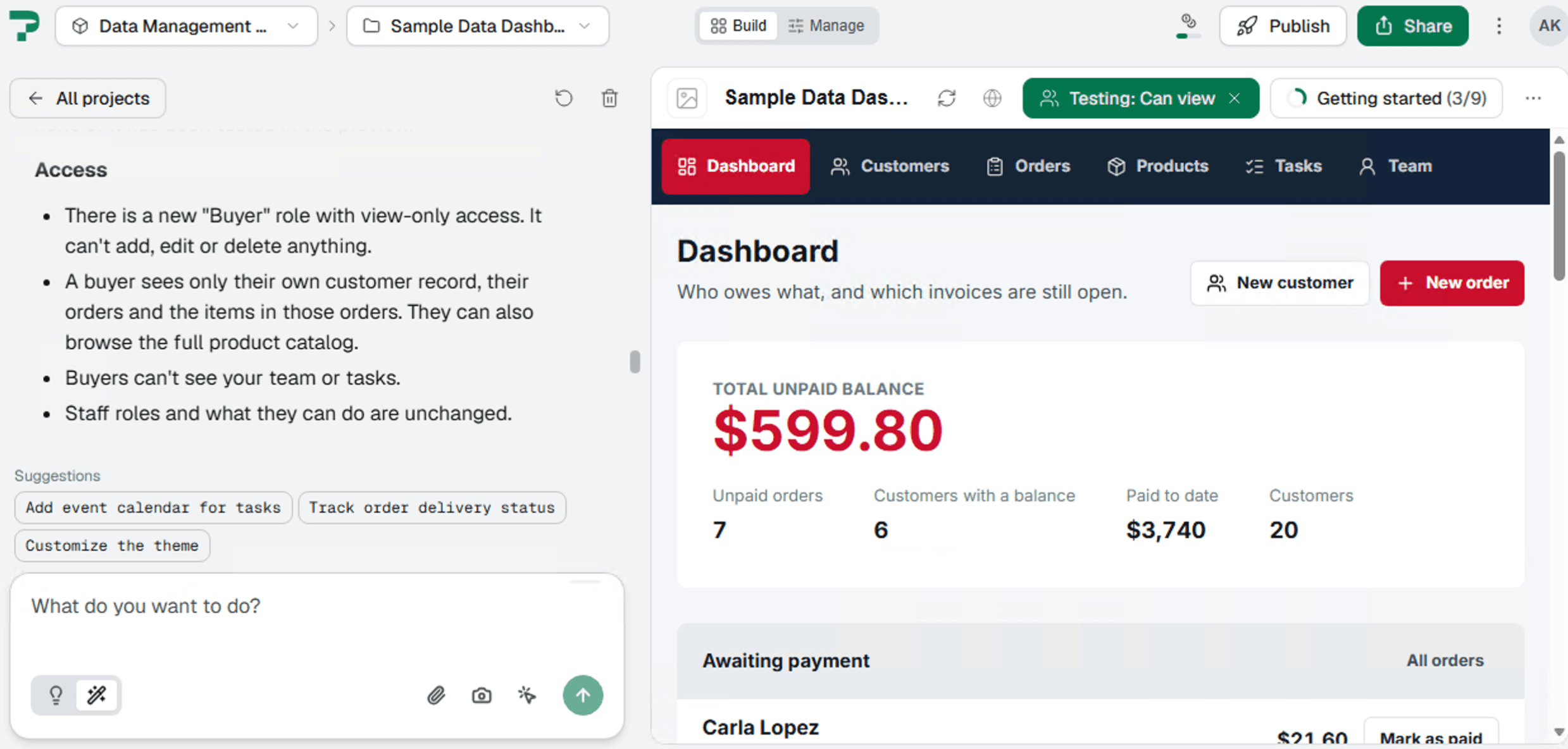
Pave, the AI app builder from Quickbase, turns a plain-language description into a working app with database, screens, and business logic already in place — all fully managed and hosted.
Want to see a real-world example? Our own customer success managers used Pave to build a change request hub and had a working first version within four hours. If you need ideas for your workflows, browse these business app ideas for inspiration.
1. Pick One Manual Process and Map How It Works
Start with the manual process behind the complaint you hear most, like "Why are marketing requests so disorganized?" or "Who's approving this?". Keep the first version small: one request type, one approval chain. Write down what goes in, who reviews or acts on it, what comes out, and what each person should see. Your notes become the prompt for step two.
2. Describe Your Process or Import Your Spreadsheet
Describe the process to Pave the same you would to a new hire. Here are a few tips to help with your first build:
- Name the roles and define who submits, who approves, and who should only view
- List the records the app tracks and the statuses each one moves through
- Spell out the rules, such as "requests over $500 need a manager's approval"
- Switch on Plan mode so Pave asks clarifying questions and shows its plan before it builds
Have a spreadsheet with all your current data? Upload it, and Pave proposes tables and relationships from your columns and data. Learn how to turn a spreadsheet into an app.
3. Connect Your Tools and Automate Workflows
Connect the tools you already use, then describe what should happen between them. Pave's connectors link to more than 350 business tools, such as your CRM or accounting software. Once you set up a connection, any workflow you build can reuse it to automate processes between your systems. Say "When a rep marks a deal Closed Won, create the project and notify finance," and Pave builds the logic, shows each step on a readable canvas, and runs it on a schedule or the moment something changes. See how Pave connectors and workflows work together to automate your manual processes.
4. Set Roles and Test With Two or Three People
Set roles before you share anything: who can view, who can add or edit records, and which fields stay hidden. Then publish the app and share it with two or three teammates who do the work today so they can test it out. Ask them to complete an ordinary task, note where they pause, and describe each fix to Pave. Test the app as each role, too.
5. Roll Out to Your Team and Improve From Feedback
When your testers can run their process seamlessly, add the rest of the team and give each person the right role. Make later changes in a draft version so the live app keeps working while you improve it. Ask for feedback during the first week, collect it in one place, and improve the app as you go. Each change only takes a short description, so you don't have to wait on IT or developers.
Build Your First App for Free With Pave
With an AI app builder, you can have a working business app in hours. But building it is only half the job. You also need a platform that can keep it secure, reliable, and running as your team and processes scale.
Pave handles both halves: it builds the app from your description and keeps it running with hosting, permissions, and workflows that connect your existing tech stack. Start building for free and only upgrade to paid plans when you need to.
FAQs
Is it hard to make an app with no coding experience?
No, learning how to make an app without coding is simple with Pave. With vibe coding, just describe the app you need and Pave handles everything for you to produce a working business app in minutes. Learn more about how Pave works.
What percentage of apps fail?
There's no single answer to this, as an app's failure can be the result of a variety of things. The usual reason an app fails is simpler: people don't use it. In our 2026 State of Employee-Built Apps Report, we found that employee-built apps are being used for daily work: 83% of AI-built apps discovered by leaders were important to daily work, and only 2% of those apps were shut down.
What are the easiest apps to build?
It varies by team, but intake and request apps are usually the easiest to build and some of the most useful. Someone submits a request, someone reviews it, and the work moves forward. Examples include a work order management app, a help desk app, a project management app, IT access requests, and an approval workflow app for expenses.
How long does it take to make an app?
A business app built with an AI app builder takes hours to days for a first version, while a consumer app for the app stores takes months. You can code it yourself in months, developers need weeks to months, and an AI app builder creates functional first version to hours or days.
How much will it cost to build an app?
The cost depends on many factors, including your route, your features, and who maintains the app after launch. Our guide to the cost to build an app breaks down the numbers.
Where does the data live when I build with an AI app builder?
With Pave, your data lives in a database that Pave builds and hosts on Quickbase's enterprise infrastructure. Describe your process, and Pave generates the tables, fields, and relationships for you, so your time goes to the workflows your app needs to run. If you want to learn more about how it works behind the scenes, check out our guide to relational database design.
Are AI app builders safe for my business data?
Every Pave app includes user management and roles that control which tables, records, and fields each person can see or change. Connector credentials stay encrypted, and admins can see every connection and workflow, limit which connectors people use, and review run history. Learn more about Pave security and compliance.
How can I safely roll out my app to my organization?
Roll it out in stages and bring IT in early: a fast build still needs a careful rollout. Start with one team, set roles before you share, and involve IT before the app touches sensitive data or other systems. Read more in our guide to enterprise vibe coding.

Written by:Shreya Patro