How to Design a Relational Database: A Step-by-Step Guide
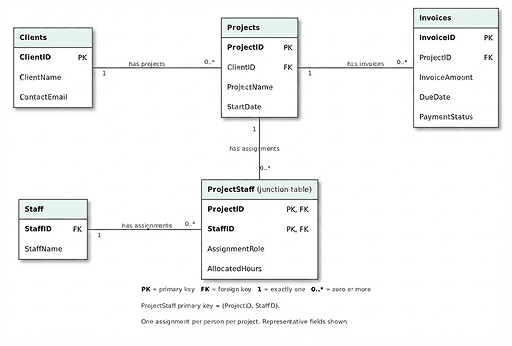
Relational database design is the process of organizing data into related tables so that each fact is stored just once and records connect via keys. This lets you organize your data without having to enter the same information multiple times.
In this article, we'll discuss the steps for designing a relational database that can scale and change as you grow. Use these steps to plan properly from the start, so you'll have less to fix or clean up later.
Key Takeaways
- Relational databases work best when your data is structured, relationships are clearly defined, and consistency is a priority.
- Define key business questions before choosing tables, fields, keys, and relationships.
- Use primary keys to identify records, foreign keys to connect them, and a junction table for many-to-many relationships.
- Normalize to reduce unnecessary duplication, then test with sample records, using Pave to build out an application later to see your design in action.
Key Terms to Know
You don't have to be a developer to get started with relational database design, but it can help to know the terms before going through the steps.
- A table stores records about a particular subject, such as all of a service provider's clients in a table named Clients.
- A record is one instance of that subject, such as one client's record.
- A field is one category of information, such as ClientName.
- A primary key uniquely identifies a record. For example, each client would have its own ClientID.
- A foreign key references a key in a related table, such as a ClientID in a table named Projects.
To dig deeper into databases and database management systems (DBMS), see our database software guide.
How to Design a Relational Database in 7 Steps
Your relational database design will usually need several revisions and iterations after being put through testing and actual use. Expect to revisit these steps as often as needed.
1. Define the Purpose and the Questions the Database Must Answer
Before you start choosing column names, clearly define what your organization needs to track and learn from your data. Write a short purpose statement that answers, "What does this database need to do?" For example, let's consider a service company that wants to see who's working on what and what's been billed by tracking client projects, staff assignments, and invoices.
You'll also need to identify everyone who will use the information in the database, such as sales, marketing, operations, accounts receivable, and field operators. Our hypothetical service company would ask questions like these to help uncover who needs access to what information:
- Which projects belong to each client?
- Who is assigned to each project?
- Which projects is each staff member supporting?
- Which invoices belong to each project?
- Which unpaid invoices are past their due dates?
2. Identify the Entities That Become Tables
Group all of the information you discovered by the things your business needs to track, also called entities — these will become your tables. Every organization will track different things, but let's use our hypothetical company as an example. They would use clients, projects, staff, and invoices as the first four entities. Keep facts with the subject they describe, such as client addresses in Clients, project due dates in Projects, and invoice amounts in Invoices.
3. Choose Fields and Data Types
Each field should represent a useful fact about the subject represented by its table. Use your answers from step 1 to select the best fields, and use them as the names for their respective columns.
For the project table, for example, fields (and their respective columns) might be:
- ProjectName: text
- StartDate: date
- Amount: a suitable fixed-precision monetary or decimal type
- AllocatedHours: a numeric type appropriate to the needed precision
Separate facts you need to search, sort, or report on independently. For example, use a more specific StartDate and EndDate rather than a combined date range.
4. Set a Primary Key for Each Table
Every table needs a reliable identifier to act as the primary key, usually a column or set of columns that uniquely identifies each table row. Primary key values must be unique and non-null, so choose values that won't change.
Here are some examples from our example business:
- Clients key would be ClientID.
- Projects key would be ProjectID.
- Staff key would be StaffID. When possible, avoid names. While they can be unique, they aren't always, and they may change too often to prevent issues later on.
- Invoices key would be InvoiceID.
Generally, a key can contain one field or multiple fields, as in the case of a composite key. The composite key combines two or more, such as with ProjectStaff as a combination of ProjectID and StaffID. Neither field would be unique alone, but the pair is unique under a rule of "one assignment per person per project."
5. Map Relationships With Foreign Keys
When you want to connect related records without duplicating all their descriptive information, use foreign keys. In the table Projects, for example, ClientID references Clients.ClientID. In the table Invoices, ProjectID references Projects.ProjectID. Client C101's name and email stay in Clients.
Foreign key constraints reject nonexistent IDs, and required-field rules prevent missing IDs where a link is mandatory. You should also set deletion rules, such as blocking the removal of any client with linked projects.
6. Normalize to Reduce Repeated Data
Normalization reviews whether each fact is stored with the subject it describes to reduce unnecessary redundancy and problematic dependencies. A short diagnostic list can help you identify repeating columns or misplaced descriptive information.
Our hypothetical company might ask questions like:
- Are client contact details repeated in every project?
- Are staff IDs combined in one field?
- Are there columns called Staff1, Staff2, and Staff3?
- Is a staff member's name repeated in every assignment?
If you see issues, take the time to fix them so they don't cause problems later on. We'll cover this more in the normalization section below.
7. Test With Sample Records and Refine the Design
Even if the tables look organized, the design may not yet fully meet your business needs. Test it using realistic sample records, and try to answer the business questions you identified in step one. You may even run reports to see if the information is truly useful.
Our service company, for example, might try running reports on a client with two projects, a project with several staff members, a client with no projects, or a staff member assigned to multiple projects. To test how the database handles complexity, they'd add multiple invoices to one project and check whether they can view unpaid invoices past their due dates.
It's important to test exceptions as well. The service company could try entering a duplicate staff-project assignment or entering a value of the wrong data type. They could also see if it's possible to delete a client with active invoices or access data beyond a user's roles and permissions.
Revise fields, rules, and relationships when your test reveals a gap not discovered by normalization.
Types of Relationships
The number of records in one table that can connect to records in another is described through relationships. The three main relationship patterns are:
- One-to-one, when each record connects to (at most) one record in another table. For example, each staff member has one supplementary profile, and each profile belongs to just one staff member.
- One-to-many, when a single record can connect to multiple records, such as a client that can have several projects (or connect to multiple records), but each project belongs to or connects back to the one client record.
- Many-to-many, when records on both sides have multiple connections. For example, staff members can work on several projects, and each project can have several staff members working on it.
A junction table helps manage multiple many-to-many connections. For example, ProjectStaff can store each assignment using ProjectID and StaffID. It stores two one-to-many relationships as well as assignment details for roles or allocated hours.
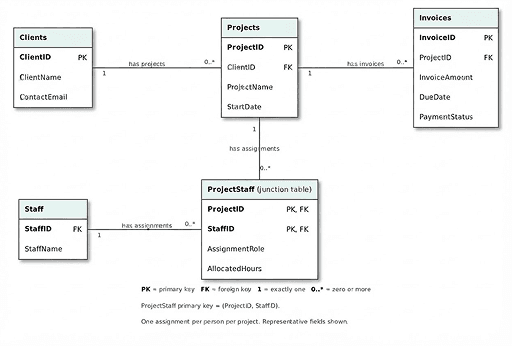
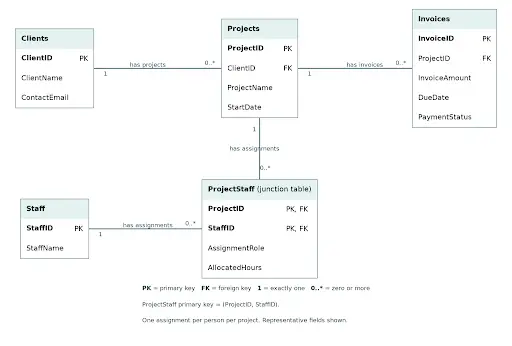
An entity-relationship (ER) diagram creates an illustrative example of how these connections work together, so teams can check that necessary tables and keys are included and relationally sound.
Normalization in Plain Language
Normalization is the process of working through a series of successive checks to reduce unnecessary repetition and problematic dependencies in your database. If you don't normalize your data, you can end up with inconsistencies when only one version of data repeated in multiple places is updated, or inadvertently delete data that depends on another record you're trying to delete.
Apply normalization rules after your first design. These rules define normal forms, each building on the previous one. The first three are sufficient for many applications, so we'll review them here:
The first form removes repeating groups or lists. It asks, "Have I put lists or repeating groups where separate records should go?" If you've crammed three staff IDs into one project field, you would correct it in this form by giving each assignment its own row.
The second form makes non-key facts depend on the whole key. It asks, "Does each detail describe the whole thing this row identifies?" For an assignment identified by a project-staff pair, the staff member's name depends only on the StaffID and belongs in Staff, while the role on the project belongs in the assignment.
The third form removes indirect dependencies. It asks, "Am I storing details about something else indirectly?" A project references its client, while the client's email describes the client and should be kept in Clients, not Projects.
Before: Combined project data | After: Related tables | What changes | Why this is risky |
Client names and contact emails repeat on every project record. | Clients: ClientID, ClientName, ContactEmail | Store client details once. Keep ClientID in Projects to connect each project to its client. | Updating a client's name or email in one project record does not update the other copies, which can cause inconsistencies. |
A project record contains a list of staff IDs or repeating fields such as Staff1 and Staff2. | ProjectStaff: ProjectID, StaffID, AssignmentRole | Store each staff-project assignment as a separate row instead of putting multiple assignments in one record. | Repeating fields limit how many staff members you can assign without changing the table's structure. |
Staff names repeat on every assignment record. | Staff: StaffID, StaffName | Store staff details once. Use StaffID in ProjectStaff to identify the assigned person. | A name change or spelling correction must be made on every assignment record. |
Project names repeat on every assignment record. | Projects: ProjectID, ProjectName, ClientID | Store project details once. Use ProjectID in ProjectStaff to identify the project. | Renaming a project requires updating every assignment record. |
Relational Database Design Best Practices
Looking for tips? These best practices can help you refine your database design:
- Choose clear names and use them consistently. Naming conventions should be descriptive enough to understand without including unnecessary special characters. For example, InvoiceDate says more than Date.
- Document what the fields mean, with important definitions and units described so people use the information consistently. Examples include whether an amount includes tax or whether the time is in CST or EST.
- Know the difference between missing, unknown, and zero values, and decide how to treat null fields. The design should distinguish between reasons for missing values when users need to record that information.
- Define rules for valid entries, such as acceptable ranges for dollar amounts and appropriate end dates for contracts. An end date shouldn't precede the start date, for example.
- Don't automatically substitute zero when the values would misrepresent the information.
- Don't store calculated results unless necessary. Instead of maintaining another value that could become inconsistent, consider deriving it. Exceptions could be made when you need historical snapshots for reporting.
Check your design with an ER diagram, and update the structure as business requirements change.
Here's a sample:
Turn Your Database Design Into A Custom App With Pave
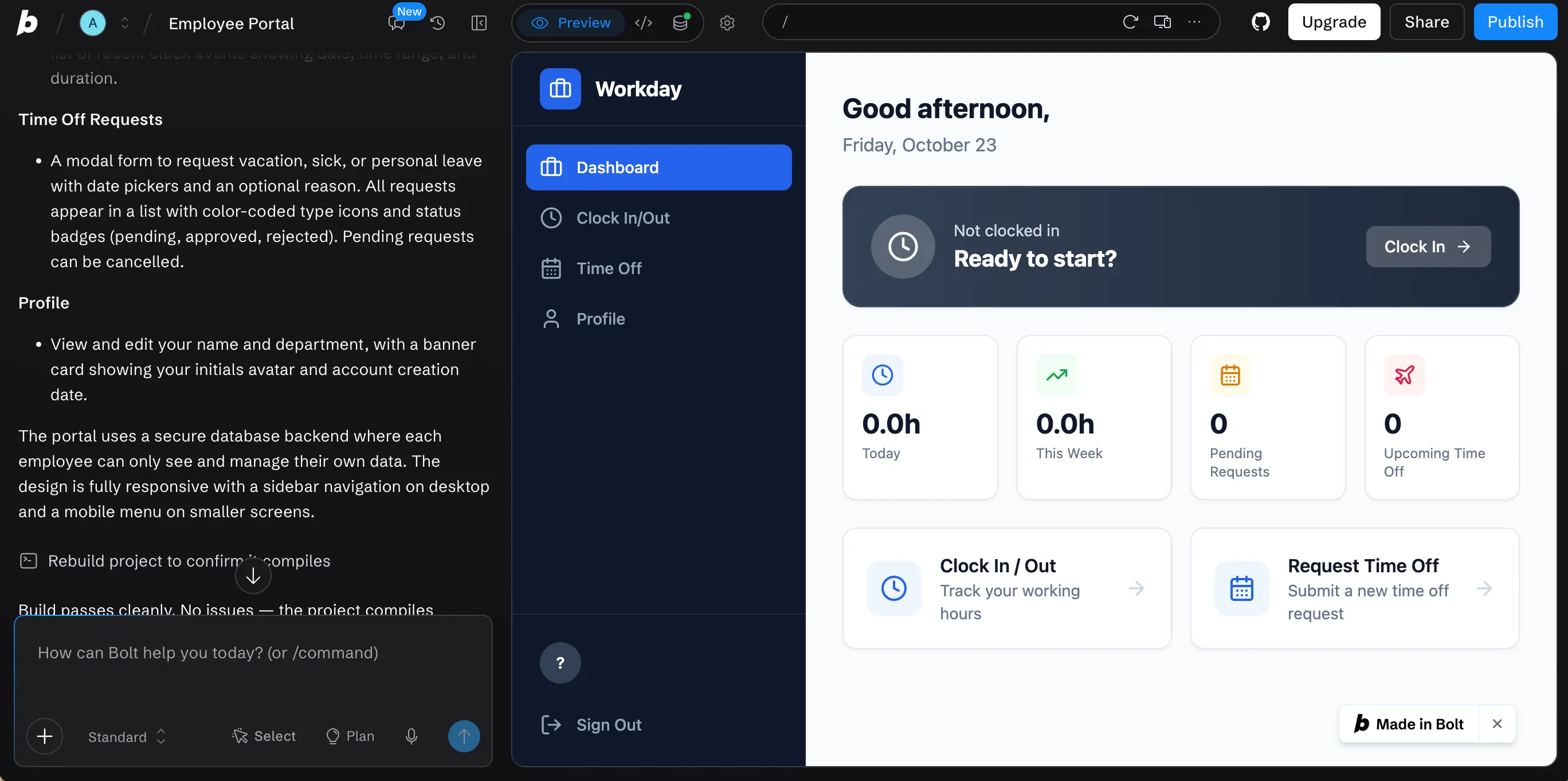
Once your team has defined the records, relationships, and rules, you can use the model to help you build an app with AI. Pave, the AI app builder from Quickbase, lets you build a fully-functioning app with an integrated data layer.
All you have to do is describe what you need in plain language or upload a spreadsheet, and it generates a working app with your data and hosting already in place. Easily adjust your app through prompts or by editing it directly, connect to the tools you already use, and start automating the workflows between them.
Ready to get started? Start building for free.
FAQs
What is a relational database?
A relational database stores data in structured tables that connect to each other through shared keys. Each table holds records about one subject, such as clients or invoices, and foreign keys link related records across tables so information is stored once and referenced wherever it's needed. This structure reduces duplication, keeps data consistent, and makes it possible to answer complex business questions by combining information from multiple tables.
What's the first step in relational database design?
Begin by identifying the database's purpose in your organization, including the questions it should answer. Use this information, along with who will use the database and any relevant reporting it will support, to create your mission statement and plot out the objectives. Without this first step, it's much more difficult to choose appropriate tables and fields.
What's the key difference between a primary key and a foreign key?
A primary key identifies a record, while the foreign key references a key in a related table. So, the same information can be a primary key or foreign key, depending on which table you're viewing it from. For example, ClientID in a Clients table is a primary key; in the Projects table, it's a foreign key.
When do you need a junction table?
A junction table is used to represent many-to-many relationships, such as reusing staff IDs to work across multiple projects. It's a place to store assignment-specific fields.
How does normalization improve a database design?
Normalization reduces unnecessary duplication of data and improves dependencies between fields and tables. It promotes consistency and ensures reporting is accurate and useful.

Written by:Mikala Holmgreen
.jpg&w=1920&q=75)