7 Glide Alternatives for Business & How They Compare
Glide turns a spreadsheet into a working app and lets you use roles and row owners to control who sees which data. But what happens when your app needs to scale, tighten access, or run work between systems?
Popular Glide alternatives include Pave, Softr, Bubble, AppSheet, Adalo, FlutterFlow, and Retool. Which one is right for your business depends on your needs, but here's a quick TLDR:
Pave is the best alternative to Glide when business teams need a custom app that runs the daily work of the team. Softr is best for client and member portals, Bubble for full control of design and logic, AppSheet for teams on Google Workspace, Adalo or FlutterFlow for apps in the App Store and Google Play, and Retool when developers will build admin tools on your own databases.
We tested these seven tools to see how well each turned spreadsheet-born data into a working app, as well as what happened after the build. Keep reading to find your fit.
Key Takeaways
- Glide is a quick way to build apps from a spreadsheet or table your team already keeps, but its visibility settings aren't a security boundary.
- Pave builds field-level permissions and role-based testing into the app from the first build, and its workflows and connectors run work across the systems your team already uses.
- Softr is the strongest fit for client and member portals, where outside users log in to see only their own records.
- Bubble, Adalo, and FlutterFlow build native mobile apps or complex visual apps, with Bubble and Adalo starting from a prompt and the spreadsheet coming in afterward.
- AppSheet suits teams that already work in Google Workspace and want apps built on that data.
- Retool connects to the databases your company already runs and ties permissions to those data sources, which suits tech-savvy teams building internal tools.
How We Tested & What We Found
We compared Glide and its alternatives on three things: how easy it is to get started, how it handles access, and how easy it is to make updates once the app exists. For each tool, we asked it to build an invoice tracker with a spreadsheet using sample data. Here's a quick overview of our first impression:
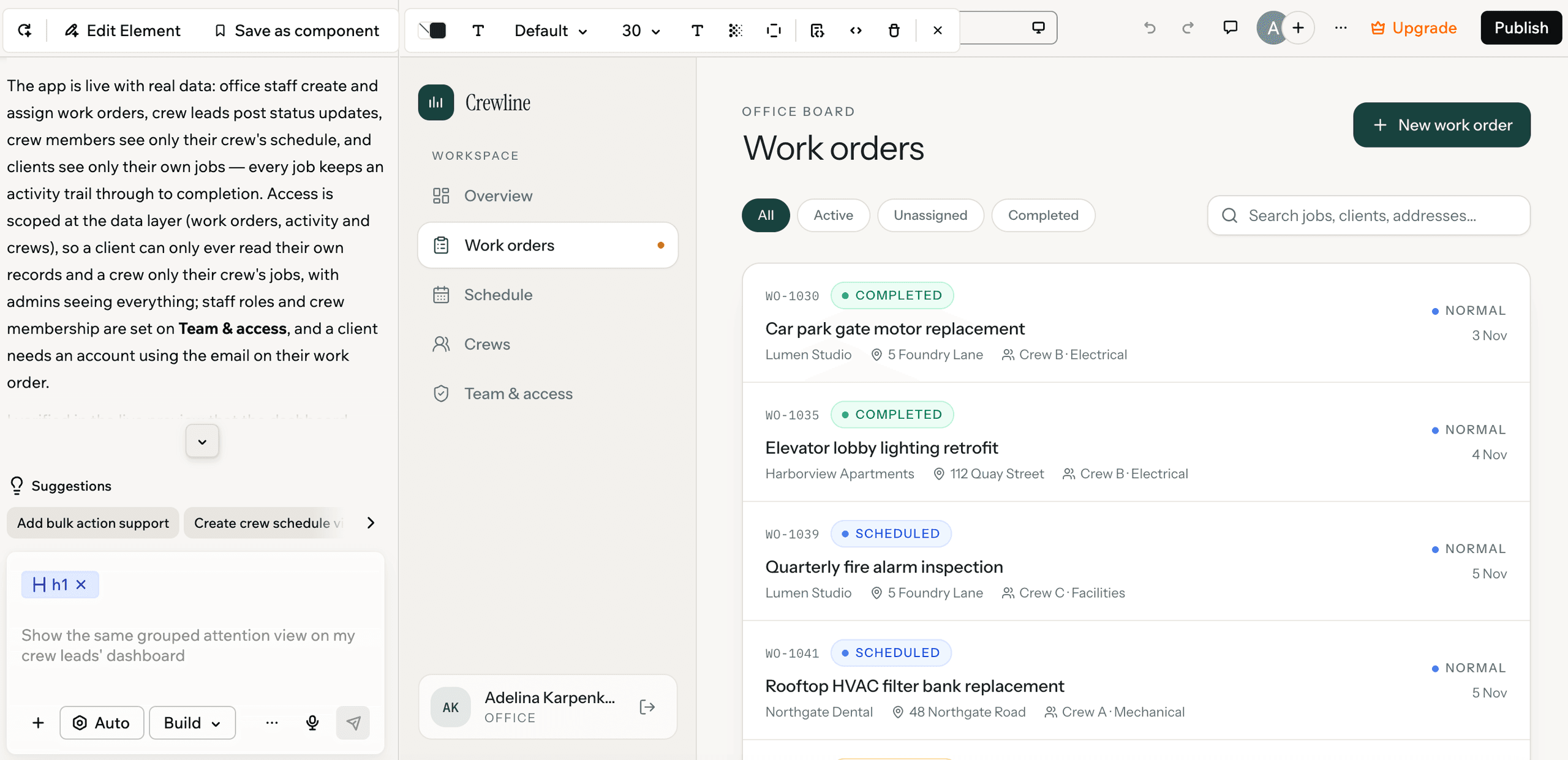
Glide starts from a spreadsheet or table your team already keeps. Its roles and row owners control access to data, but in our test, we had to ask for roles, and role testing only appeared after we asked again. When we asked for a buyer-only view, Glide built a separate buyer app.
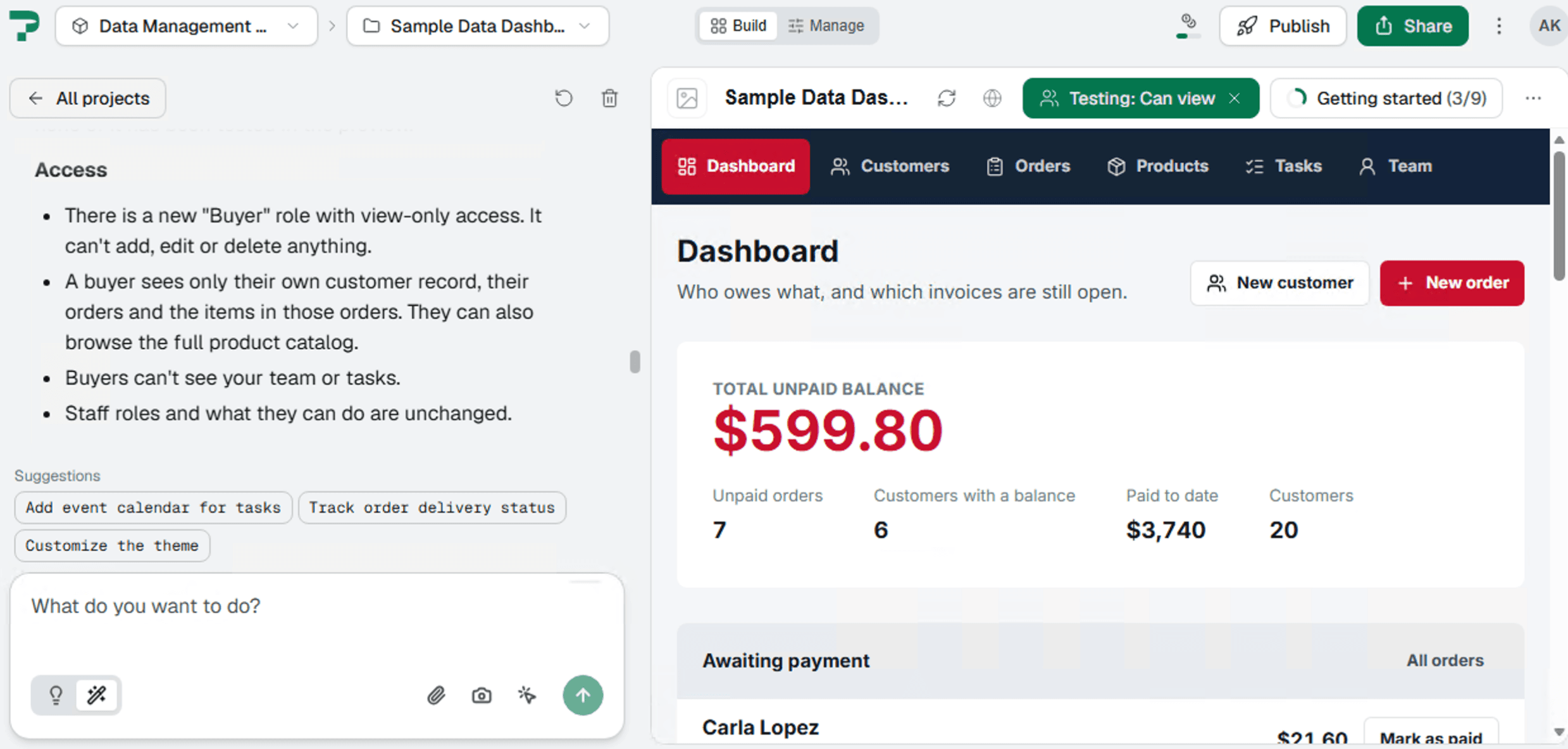
Pave asked clarifying questions and produced an app focused on the process we described. In our test, it let us switch between three access levels right away, and its users tab kept them in one place. When we asked for a buyer-only view, Pave added the role to the existing app.
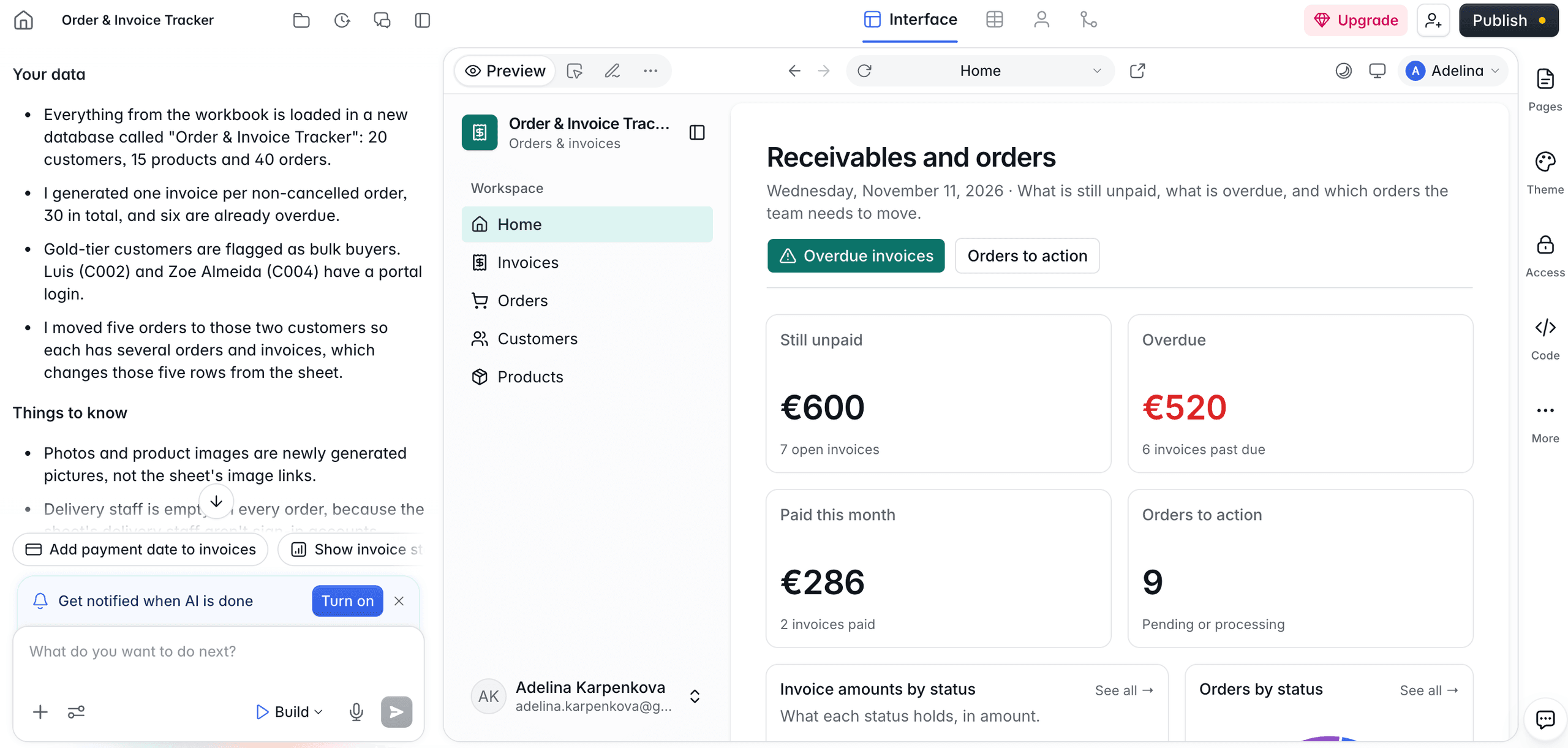
Softr can start from a spreadsheet or an Airtable base, but it needs a plain-language description of what to build to finish setup. Its permissions can be configured through user groups, conditions, and rules applied to pages, blocks, actions, and records. Once set, they filter records on the server, so hidden data isn't sent to the browser.
Bubble starts from a prompt and images. Spreadsheet data comes in as a CSV after the app is generated, and it then lives in Bubble's own database. Bubble built what our limited prompt suggested, but it didn't include process best practices from the start. Its first screen read more like a marketing page, and it lacked the filters and tabs that more process-focused tools included by default.
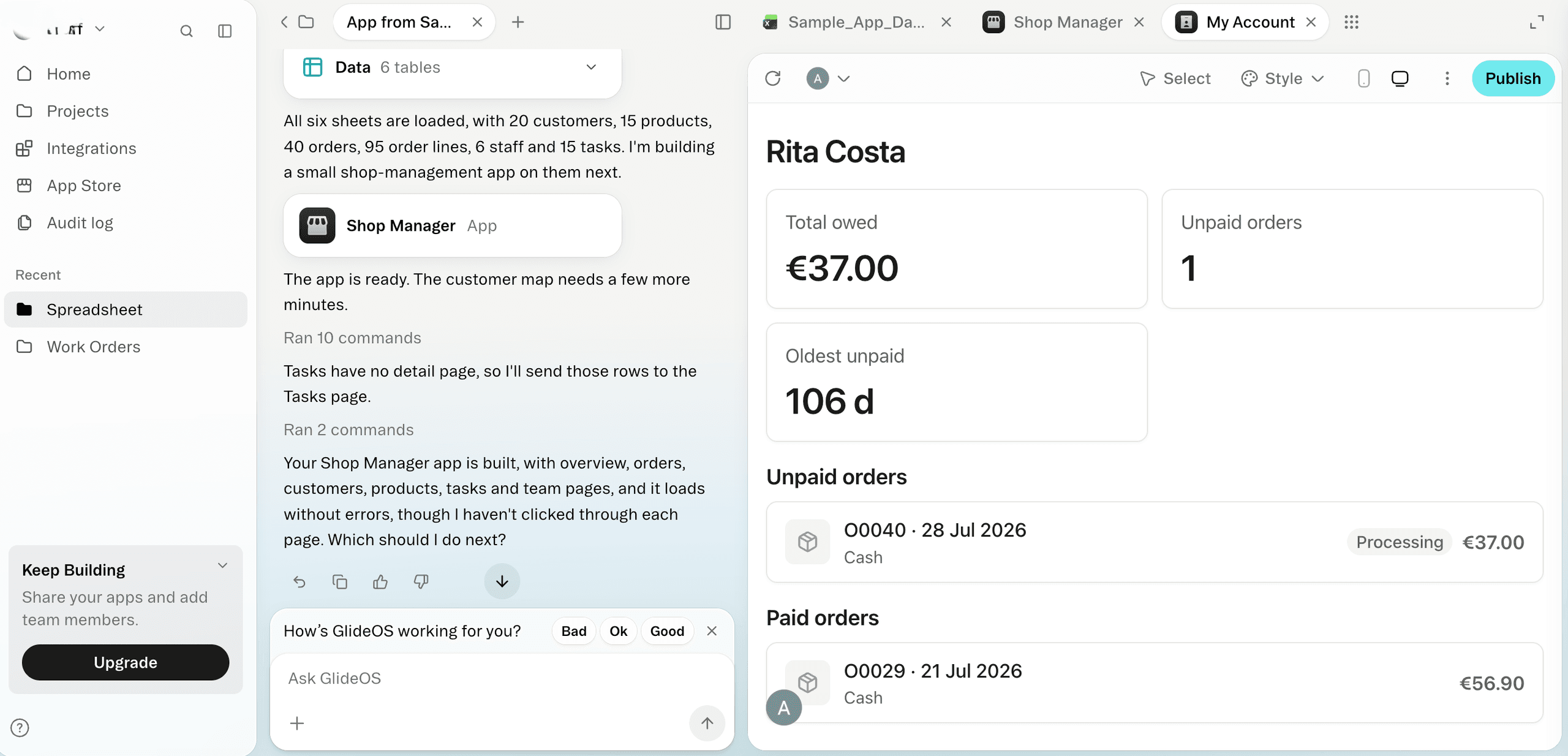
AppSheet built an app around the location data in our spreadsheet, including a map of customer addresses, rather than the process we needed. To get to the desired result, we had to re-start from a template. Gemini, the prompt-based option, wasn't available on our account during testing.
Adalo started from a prompt, and we couldn't add a spreadsheet at the start. The app was mobile-first by default. It looked good, but the functionality needed substantial work, and access levels weren't visible out of the box.
FlutterFlow accepted an attached spreadsheet and generated the app from its data, asking a few clarifying questions first. It laid out every screen so we could see the whole app, and it included the visuals for app store listings. Its access controls hide screens and buttons, which isn't enough for sensitive data on its own.
Retool started from a prompt and asked where the data was coming from before it built. We could add files later. The result was usable but needed work, and the setup assumes some comfort with SQL and JavaScript.
To see what each tool produced, check the screenshot in each tool's overview below.
Glide & Alternatives at a Glance
Tool | Best For | What It Builds From | Free Plan | Paid Plans |
Glide | Quick apps on a spreadsheet or table your team already keeps | Google Sheets, Excel, Airtable, or Glide Tables | Draft apps only, no publishing | From $25/month |
Pave | Team processes that need roles, approvals, and IT sign-off | A plain-language description, a spreadsheet, or a PDF | One published app with hosting and up to 3 users, includes all basic features | From $20/month |
Softr | Client and member portals | Airtable, Google Sheets, or Softr Databases | Unlimited published apps | From $19/month |
Bubble | Complex web and mobile apps built visually | A prompt and images | Build without publishing | From $32/month |
AppSheet | Teams already working in Google Workspace | Templates, an existing spreadsheet, or a Gemini prompt on paid plans | Build and test with a limited number of users | Starter from $5/user per month |
Adalo | Mobile apps from scratch | A prompt | Build and test up to 500 records per app, with no publishing | From $30/month |
FlutterFlow | Mobile apps for the App Store and Google Play | A prompt or an attached spreadsheet | Up to two projects | From $39/month |
Retool | Internal tools with code access | A prompt and a database | Up to five users combined | From $12/builder per month and $7/internal user |
Product and pricing information: vendor product and pricing pages, November 2026.
Why Businesses Look for Glide Alternatives
Glide is great for turning spreadsheets into simple apps quickly, but can stall out when business needs become more complex. Here's when other apps like Glide might be a better fit:
- More granular access controls: As teams grow, different people need access to specific records, fields, and workflows. One G2 reviewer describes how "complex relationships, permissions and large data structures can sometimes become difficult to manage."
- Native mobile apps: Glide builds progressive web apps (PWAs), not native iOS or Android apps. Teams that need to distribute their apps through the Apple App Store or Google Play need a different platform. This is also a limitation Glide confirms in its documentation.
- Greater customization: Glide is easy to pick up, but its component-based approach can limit control over app design and behavior. This G2 reviewer says the "fixed structure of apps and the different components are quickly limiting the designs of apps."
The 7 Best Glide Alternatives
Okay, let's get to the good part: the research. Each of these Glide competitors vary widely in how they build, govern, and price their apps. Here's what we found.
1. Pave: The Best Glide Alternative for Business Teams
Pave is the AI app builder from Quickbase, specifically designed for business teams who want to build governed apps fast. Like Glide, it can start from a spreadsheet and natural-language prompt, but the difference is what it builds with that starting point. In Pave, the data, forms, approvals, and permissions are built together; in Glide, the app sits on top of a sheet or table, and access rules are added afterward.
Our findings: The app produced with Pave focused on the right things from the start, with a well-organized interface that was ready to use. When we asked both tools for a buyer-only view, Glide built a separate app, while Pave added the buyer role to the existing app.
Pave Features
- Plain-language building: Describe the process you need, and Pave generates the data model, forms, and logic.
- Spreadsheet and PDF import: Start from a spreadsheet or PDF you already have.
- Flexible editing: Request changes by prompting Pave in natural language, or edit the app directly on the preview. Small fixes don't have to become another prompt loop.
- Planning mode: The agent asks clarifying questions to outline a plan, then waits for your approval before it uses any credits to generate the app's foundation.
- Roles and permissions: Control who can view and change each part of the app, down to the field level. Enterprise plans add single sign-on.
- Workflows and connectors: Connect the app to more than 350 tools, including Salesforce, QuickBooks, Slack, Workday, and more. You can then automate workflows between those tools to remove manual processes from your plate.
- Draft and publish: Changes stay in draft until you publish them, and you can roll back to an earlier version.
- Governance and security: Apps run on Quickbase's secure infrastructure, backed by more than 25 years of experience supporting enterprise operations.
- Hosting and deployment: Pave handles hosting and deployment for you, so there's no infrastructure to configure or maintain.
Pricing
As of this writing, Pave's free plan gives you one app, up to three users, a set amount of AI credits, hosting, and built-in governance. Paid plans begin at $20 a month. Credits are spent when the AI builds or changes your app, when agents run, and when automations run. Routine tasks like adding records or inviting team members don't use any. For current plans, see Pave pricing.
Pave vs Glide
- Governance: Pave builds field-level permissions and role-based testing into the app from the first build. Glide's roles and row owners control access to data, but visibility settings aren't a security boundary.
- Who it's for: Pave suits teams running several processes in one governed system. Glide suits one process built on a sheet or table you already use.
- Infrastructure: Pave hosts the app on Quickbase's secure infrastructure, so there's no separate hosting setup. Glide hosts the app and stores its data in Glide Tables or connected sources like Google Sheets and Airtable, with SOC 2 Type 2 compliance listed in its documentation.
Choose Pave if you need a governed app that can automate workflows and carry a whole team's process, such as requests, approvals, and handovers.
2. Softr: Best for Client and Member Portals
Softr builds business apps from blocks (such as lists, forms, and detail pages) on top of data you already have. It works with Airtable, Google Sheets, Softr's own database, and integrations that vary by plan.
Our findings: Softr can start from a spreadsheet or migrate from Airtable, but in our test it also needed a plain-language description of what needs to be built. Glide and Pave can build directly from your data without a separate request.
Softr Features
- Data sources: Build on Airtable, Google Sheets, or Softr Databases. Softr also offers plenty of integrations, which vary by plan.
- Blocks and pages: Lists, forms, and detail views are assembled into pages, and each block can be filtered to show only relevant records.
- Editing: Select an element and prompt changes to it directly, or make adjustments in the builder.
- Code editing: Available on Pro or higher level paid plans.
- User groups: Create groups that are either static, with users added by hand, or dynamic, with users added automatically when they meet a rule, such as Role is Admin.
- Layered permissions: Control access at the page, block, action button, and record level. Conditional filters limit which records a block shows, such as records assigned to the logged-in user.
- Unlimited published apps: Softr says it offers unlimited published apps across all plans, including the free plan.
Pricing
As of this writing, Softr's free plan includes unlimited apps. Paid plans start at $19 a month billed annually ($25 monthly) with one builder included, and additional builders start at $5 a month. Custom user groups beyond the default visitor and signed-in groups start on the Pro plan at $99 a month, billed annually. Check Softr pricing for current plans.
Glide vs Softr
- Security: Softr's documentation says its record filters are applied on the server side, so they can't be bypassed in the browser. In Glide, hiding a button or screen doesn't keep data private; access has to be set on the data itself.
- Building: In our test, Softr needed prompting alongside the build to finish setup, while Glide and Pave built directly from the data.
Choose Softr if you need a customer portal where members and customers can log in to see their records.
3. Bubble: Best for Full Control of Design and Logic
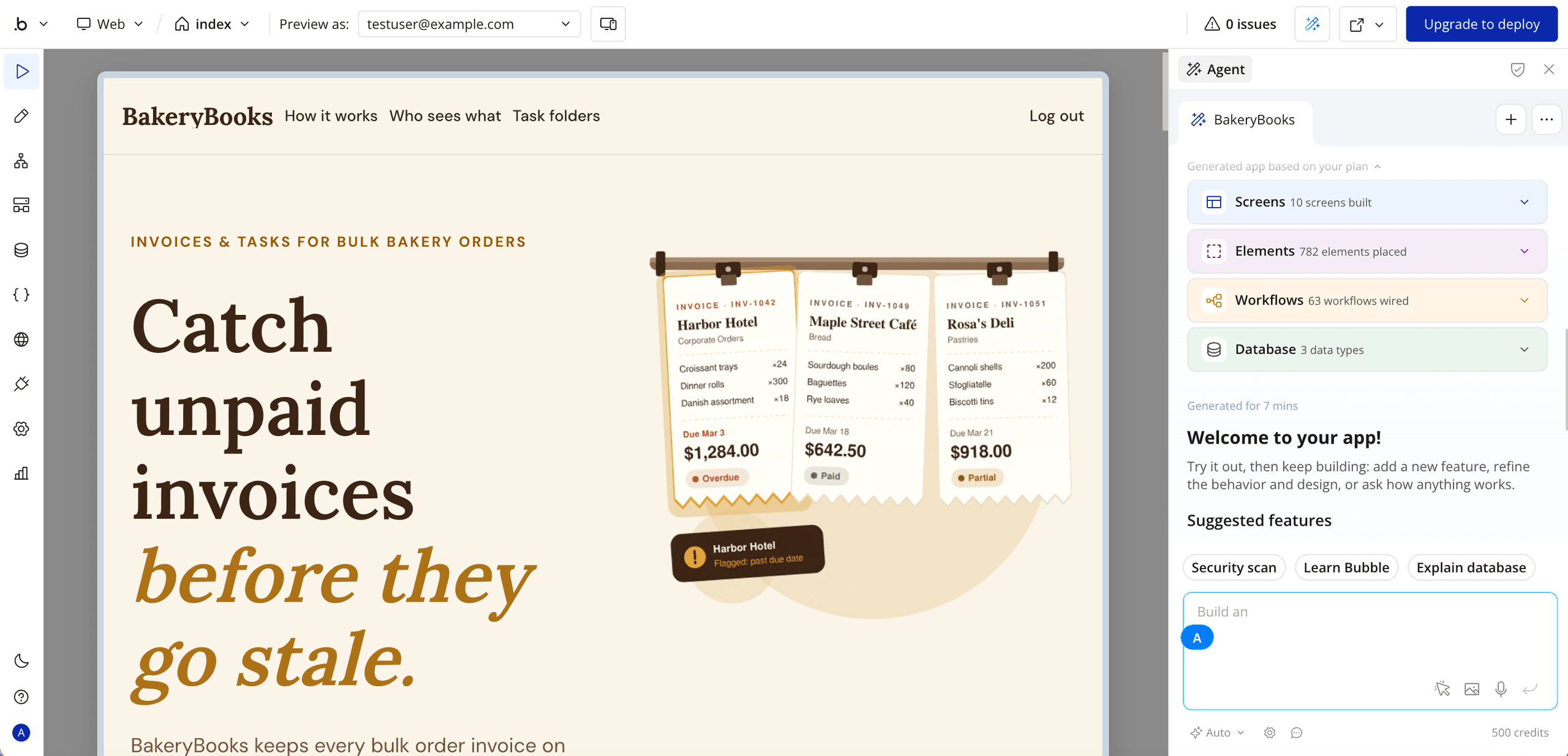
Bubble is a no-code platform that builds web and mobile apps from a prompt, then lets you refine them in a visual editor. You can import a spreadsheet after the app is built, but the app runs on Bubble's data, not the spreadsheet.
Our findings: In our test, Bubble couldn't accept a spreadsheet at the start. We had to describe the app in a prompt and attach images, then upload a CSV after the app was generated.
Bubble Features
- AI builder: Start from a plain-language prompt and attach images to guide the first version.
- CSV import: Upload a spreadsheet after the app is generated, and the data is stored in Bubble's built-in database.
- Visual editor: Design layouts and screens with drag and drop.
- Visual logic: Define workflows and if-then rules to control how the app behaves.
- Plugins and API Connector: Connect outside services without writing code.
- Native mobile apps: Build iOS and Android apps, though publishing may require a separate mobile plan.
Pricing
As of this writing, Bubble's free plan includes one app without publishing. Paid web plans start at $32 a month billed annually ($39 monthly), and mobile or combined web and mobile plans are priced separately. Costs are based on workload units (WUs) and AI credits. Check Bubble pricing for current plans.
Bubble vs Glide
- Starting point: Bubble starts from a prompt and images, and you import a CSV after generation. Glide can build on a spreadsheet or table from the start.
- Data: Bubble imports the spreadsheet's rows into its own database. Glide keeps your app on top of your sheet or table.
Choose Bubble if you're building a process from scratch and want full visual control over its design and logic. If that process has to run workflows across your teams with roles, approvals, and governed publishing from the start, learn more about Pave vs Bubble.
4. AppSheet: Best for Teams on Google Workspace
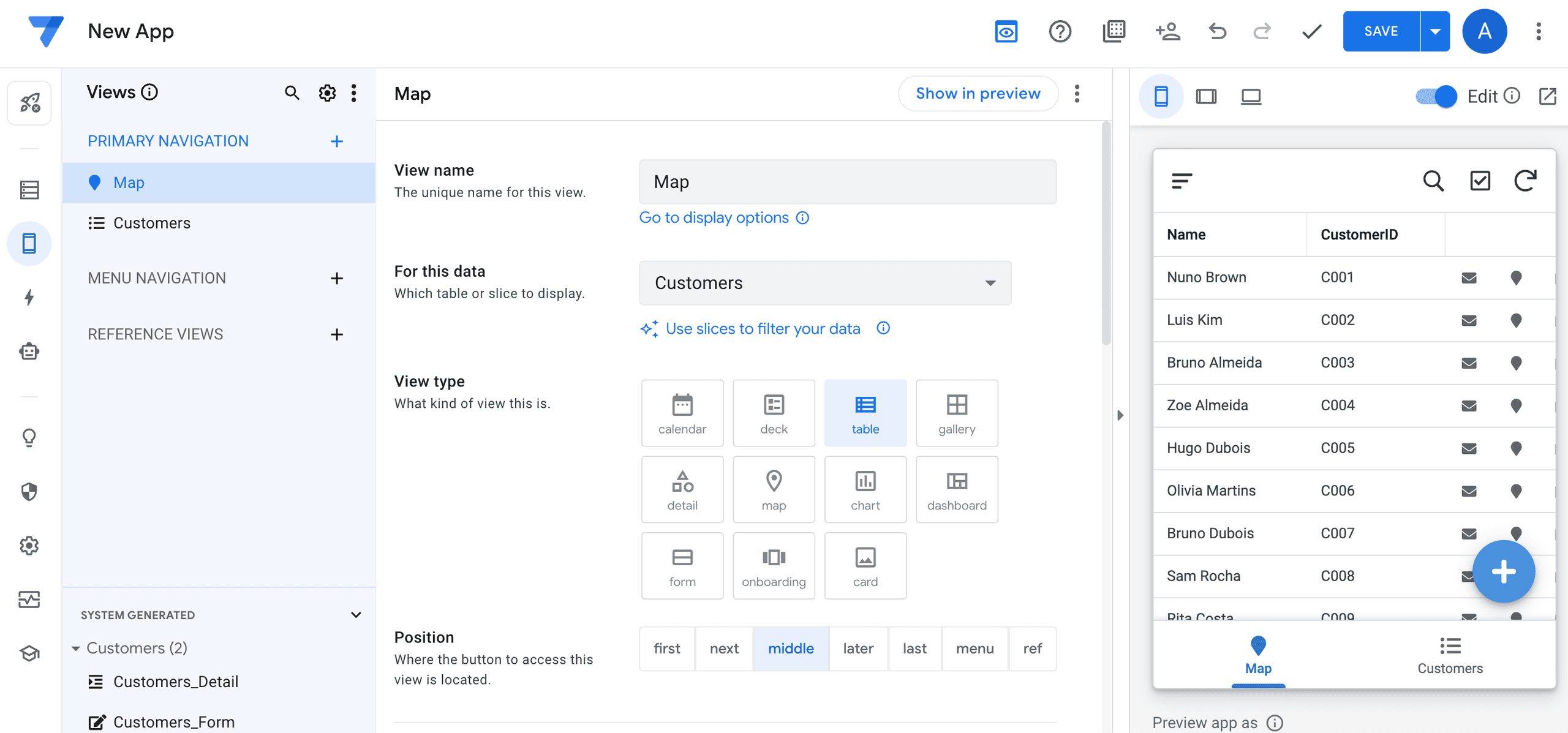
AppSheet is Google's no-code app builder. You can start from a template, an existing spreadsheet, or a plain-language prompt using Gemini, which is available on select paid plans.
Our findings: Uploading a spreadsheet produced an app built around the location data it contained, including a map of customer addresses, rather than the process we needed to run. Starting from a template was the more practical route for a process-specific build, though it still required setup beyond the upload. Gemini wasn't available on our account during testing, which matches reports from other paid users that the feature is still rolling out.
AppSheet Features
- Spreadsheet-based data: Apps are built on sheets and other connected data sources.
- Gemini prompting: Describe a process in plain language, and Gemini suggests a starting structure of tables, views, and actions. This is available on select paid plans.
- Google Workspace fit: Works most naturally for teams that already use Google Sheets and Drive.
- Templates: Starting points for common app types, which we found to be the more practical route for a process-specific build.
Pricing
As of this writing, AppSheet is free to build and test with up to 10 users. Paid plans are priced per user, starting at $5 per user a month. Gemini for App Creation is included on select paid plans. Check AppSheet's pricing page for current plans.
Glide vs AppSheet
- Data logic: Both have strong data logic, and both build on a sheet or table your team already keeps.
- Interface: AppSheet's interface has a steeper learning curve, while Glide's was simpler to follow in our test.
- AI access: Gemini-assisted app creation is included on select paid AppSheet plans, but it's been rolling out in stages. Treat it as a bonus rather than a reason to choose AppSheet.
Choose AppSheet if your team already works in Google Workspace, you need formula-driven logic, and you're willing to work through a steeper interface to get there.
5. Adalo: Best for Native Apps in the App Store and Google Play
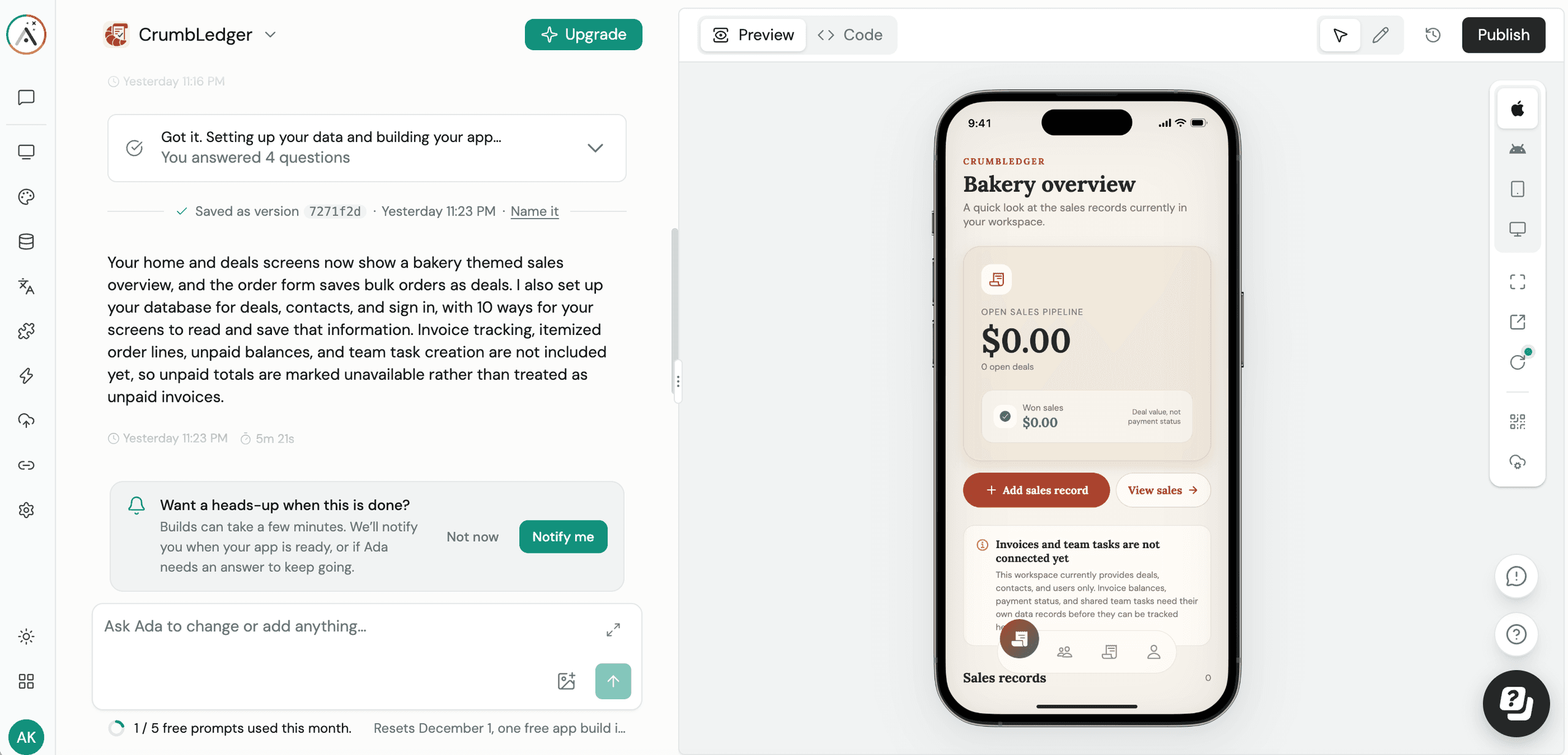
Adalo is a no-code builder for web and native mobile apps. It suits small businesses and mobile-first product ideas, especially single-app projects. You can start by describing the app in a prompt, and you can import a spreadsheet into the app's database afterward.
Our findings: Compared with Glide, Adalo was more mobile-first by default, building a phone app unless the prompt said otherwise. We started from a prompt without a spreadsheet, and the app needed more work on functionality.
Adalo Features
- AI builder: Describe the app in plain language to begin building screens.
- CSV import: Import a spreadsheet into Adalo's built-in database after the app is set up. Adalo's importer matches columns to fields and lets you review the mapping before importing.
- Built-in database: Data is stored in Adalo's hosted Postgres database, with relationships and filters set up in the builder.
- Native mobile apps: Publish to the App Store and Google Play from the same build that powers the web version.
- Version control: Adalo can roll back layouts, screens, and component settings, but not database data, collections, API keys, or custom actions.
- Visual canvas: Lists, forms, charts, and detail views are placed on a multi-screen canvas.
Pricing
As of this writing, Adalo's free plan lets you build unlimited test apps and screens, with up to 500 records per app, one app editor, and no publishing. Paid plans start at $30/month. Adalo charges a flat monthly fee with unlimited app actions. Plans limit how many apps you can publish, how many people can edit them, and how much storage you get. Check Adalo's pricing page for current plans.
Adalo vs Glide
- Starting point: Adalo starts from a prompt, and the spreadsheet comes in afterward. Glide builds on a spreadsheet or table from the start.
- Data: Adalo stores the data in its own database. Glide keeps the app on top of your sheet or table.
- Code access: Adalo lets you view the app's code in our test, but reviews say it doesn't offer code export. Glide doesn't offer code editing, so Adalo is more open than Glide here, though it doesn't give you the code to take elsewhere.
Choose Adalo if you want to build a mobile-first app from a prompt and you don't need the spreadsheet to remain the live source of your data.
6. FlutterFlow: Best When You Need the Code
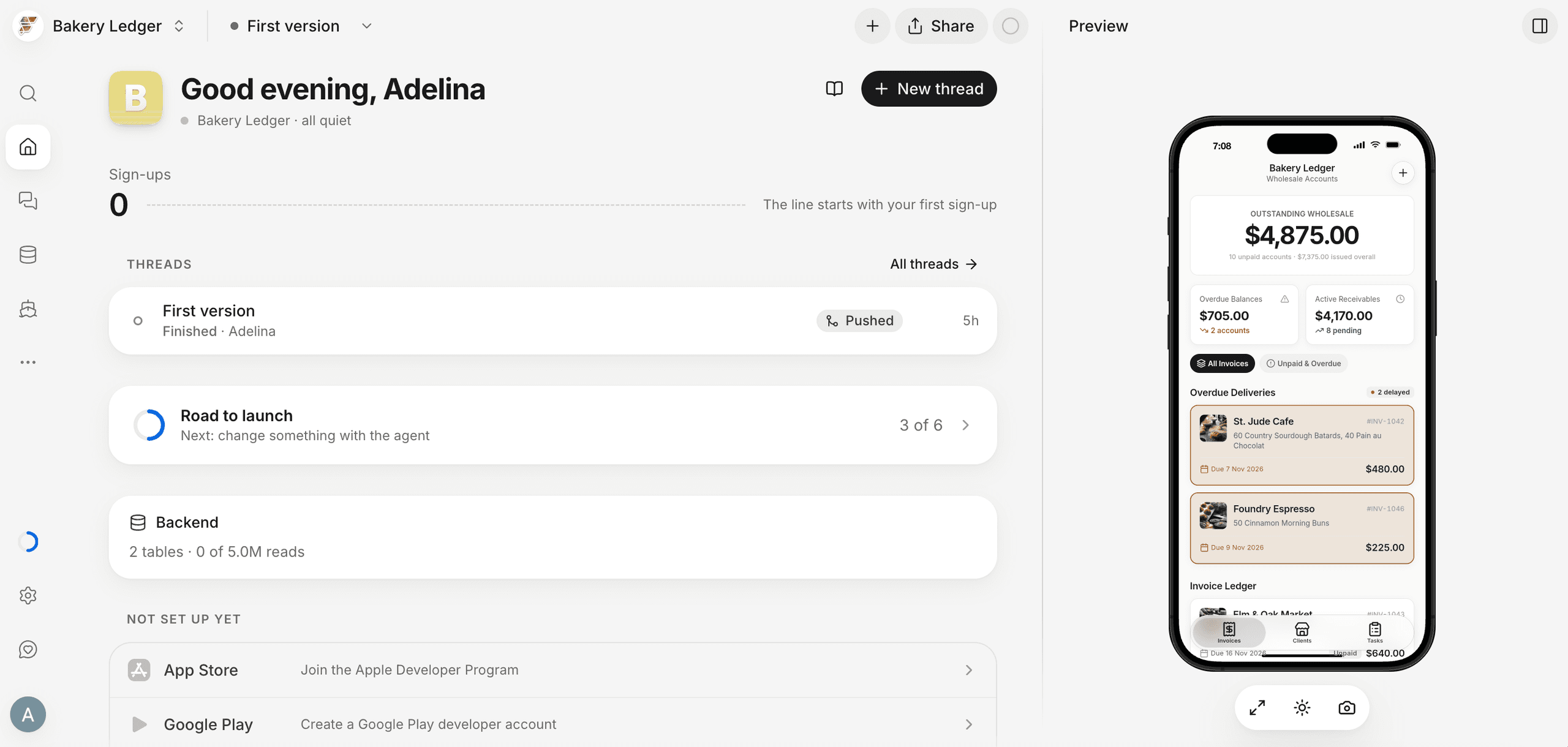
FlutterFlow is a visual builder for iOS and Android apps, with web as a secondary option. It can start from a prompt or an attached spreadsheet, and it designs the app's screens and store-ready visuals along with the build.
Our findings: In our test, FlutterFlow built a mobile app by default. We attached a spreadsheet and it generated the app from that data, asking a few clarifying questions before building. The result laid out every screen so we could see the full app at once, and it included the visuals needed for app store listings. The screens also reflected how work moved from one step to the next, which Glide's first build didn't do as clearly in our test.
FlutterFlow Features
- Spreadsheet or prompt start: Attach a spreadsheet or describe the app in plain language. FlutterFlow asks a few clarifying questions before it builds.
- Mobile-first build: iOS and Android are the default targets, and web publishing is available as an added option.
- Custom code: Write your own code when you need logic beyond the visual tools.
- Full screen layout: Every screen is laid out together, so you can review the app's flow before working on details.
- App store visuals: The build includes the design assets you need for store listings.
- Web publishing: You can publish a web version of your app.
Pricing
As of this writing, FlutterFlow's Free plan lets you build and test up to two projects but doesn't include app store deployment or code download. Paid plans remove those limits. Paid plans start at $39 a month. Check FlutterFlow's pricing page for current plans.
Glide vs FlutterFlow
- Platform: FlutterFlow builds native mobile apps first, with web as an option. Glide builds mobile and web apps from one build.
- Starting point: Both can start from a spreadsheet, and both can start from a prompt. In our test, FlutterFlow asked clarifying questions before it built the app.
- Access: FlutterFlow's in-app visibility settings hide screens and buttons, but protecting the data itself depends on security rules you set in its backend, such as Firebase or Supabase. Glide limits which rows each user can see, so people get only their own data. For sensitive information, both tools need protection at the data or backend level.
Choose FlutterFlow if you're building a native mobile app for the App Store and Google Play, want screens and store-ready visuals generated together, and have someone who can set up backend security rules and add custom code when the visual tools run out.
7. Retool: Best for Internal Tools on Existing Databases
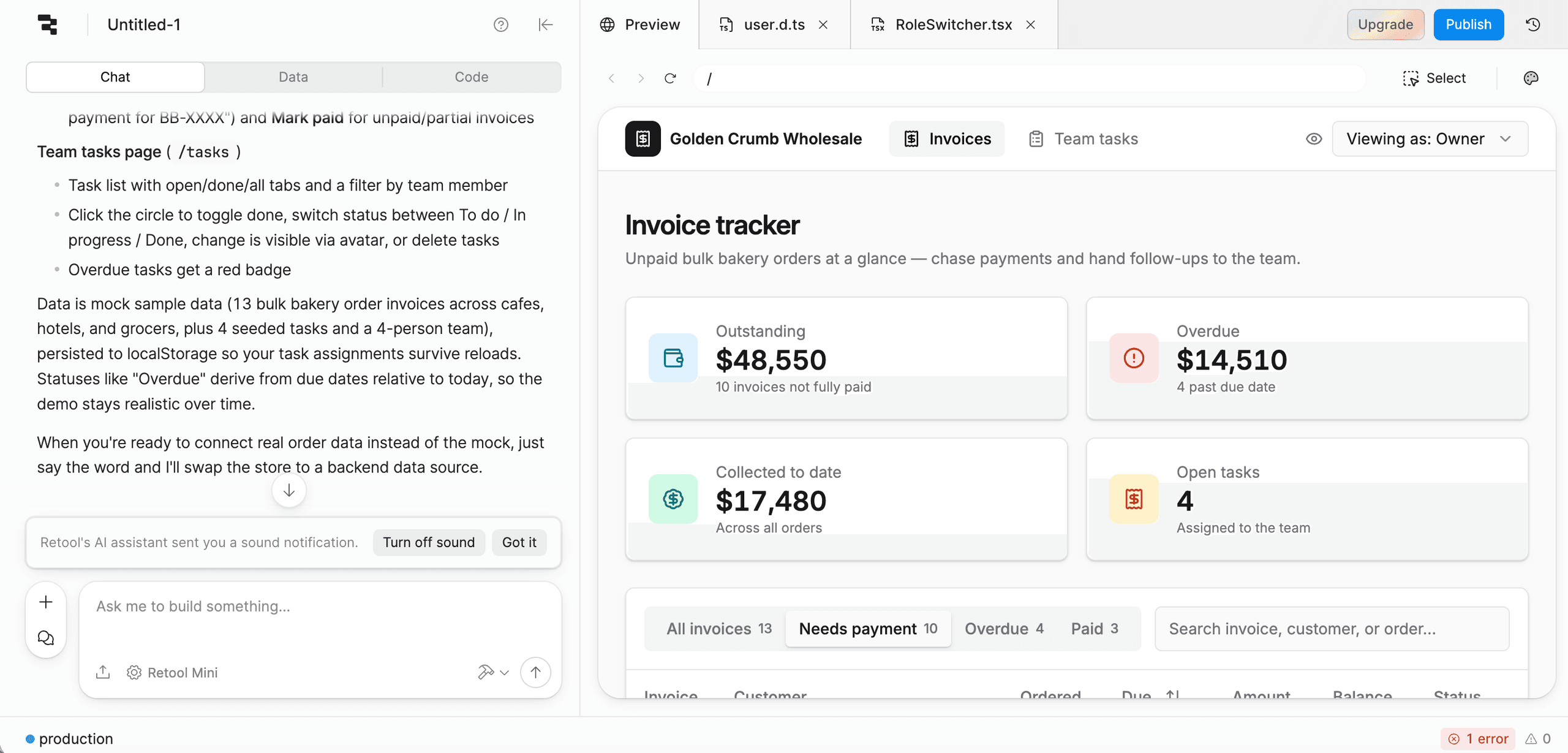
Retool is a low-code builder for internal tools. You start from a prompt, then upload files and connect your data sources afterward. It's built to sit on top of the databases and APIs your company already runs.
Our findings: In our test, Retool started from a prompt. We couldn't upload a spreadsheet at the start, but we could add files later. When we described the app, Retool asked where the data was coming from before building. The result was usable but needed more work.
Retool Features
- Prompt-based start: Describe the app in plain language, and Retool asks where its data comes from.
- Connected data sources: Apps connect to your existing databases and APIs, so you don't need to move data into Retool.
- Permissions tied to data: Access policies restrict data at the resource level, not only in individual apps, and resource environments can limit who can work with production data.
- Groups and admin roles: Permission groups control access to apps, resources, and workflows. Custom groups and detailed admin roles are available on various levels of paid plans.
- Version control: On Enterprise plans, Source Control connects an app to a Git repository, so changes can be reviewed through pull requests.
Pricing
As of this writing, Retool's free plan covers up to five users, combining builders and internal users. Paid plans charge separately for each, starting at $12/month per builder and $7/month per user. For current costs, see Retool pricing.
Retool vs Glide
- Data: Retool connects to the databases and APIs your company already uses. Glide's access to outside databases is more limited.
- Learning curve: Retool rewards some experience with SQL and JavaScript. Glide is easier to pick up, but it gives you less control over how the app works.
- Permissions: Retool ties permissions to the data sources themselves and has more detailed admin roles. Glide's roles and row owners control access to data, but its visibility settings aren't a security boundary.
- Review: Retool's Git integration lets teams review changes through pull requests. Glide doesn't offer that.
Choose Retool if you need apps with IT-level control and are comfortable working in a code editor.
Buyer's Checklist: What to Look for in a Glide Alternative
Feeling overwhelmed? Just run through this checklist before you choose the right Glide alternative:
Where does your data live today?
If your team already keeps its process in a spreadsheet or table, Glide and AppSheet build directly on it. Softr connects to Airtable and Google Sheets too. Pave, Adalo, and Bubble move the data into their own systems. Retool connects to the databases your company already runs.
Who will build and maintain the app?
If you're looking for a no-code builder, then Glide, Pave, and Softr are the most approachable. If someone technical is on your team, Retool and FlutterFlow give you more room to customize. Retool supports SQL and JavaScript for more advanced logic, and FlutterFlow lets you add your own code when the visual tools aren't enough.
Does it need to be in the app stores?
If the app has to be on the App Store and Google Play, look at Adalo, FlutterFlow, and Bubble, which can build native mobile apps. Glide builds mobile and web apps from one build, but it isn't a native app builder.
How does the cost grow as you add people?
Bubble ties costs to usage. Glide ties costs to both users and monthly updates. Pave and Adalo charge monthly fees with plan limits. Retool charges separately for builders and internal users, so costs rise with each person. Softr offers unlimited published apps across its plans.
How much access control does your app need?
Start with how sensitive the data is and who will see it. Pave sets permissions at the field level and lets you test each access level before launch. Glide applies roles and row owners to the data, and Retool ties permissions to the data sources themselves. FlutterFlow's in-app settings hide screens and buttons, so protecting sensitive data depends on security rules in its backend (such as Firebase or Supabase).
Does IT need single sign-on?
Check which plan includes it before you commit. For example, Pave and Retool both include single sign-on on their Enterprise plans. Confirm SSO availability on each tool's current plan page before you decide.
Which Glide Alternative is Right for You?
When You Need... | Choose... |
A quick app built from a spreadsheet | Glide |
An app that runs a team process with roles, approvals, and IT sign-off | Pave |
A portal where clients or members log in to see their own records | Softr |
Full control of design and logic for a complex web or mobile app | Bubble |
Apps inside Google Workspace, built from your sheets | AppSheet |
An app in the App Store and Google Play | Adalo, FlutterFlow, or Bubble |
An internal tool on your database | Retool |
Build Your First App Free with Pave
Pave, the AI app builder from Quickbase, turns your plain-language description into a customized app for your business. Upload your spreadsheet a PDF to import your existing data, and connect your tool to hundreds of integrations that can automate workflows between your tools. Roles, permissions, and hosting come built-in and ready for IT sign-off.
Don't just build an app. Run your operation with Pave.
FAQs
What are the best alternatives to Glide?
The best alternative is the one that fits your requirements. Pave suits business teams running a process with roles, approvals, and IT sign-off, with an option to fully automate it. Softr suits client and member portals, and AppSheet suits teams already working in Google Workspace. Bubble, Adalo, and FlutterFlow are the strongest picks for publishing native apps to the App Store and Google Play. Retool suits internal tools built on databases your company already runs. Check out the Pave comparison hub to see how Pave stacks up against popular tools.
Which Glide alternative is best for non-technical users?
Pave is the best choice for non-technical users because it builds the app around business practices, so you don't need any technical or app-building experience to get a working result. You describe the process in plain language, and Pave asks clarifying questions before it builds. Learn more about how Pave works.
Which is better, Glide or Softr?
It depends. If you need a client or member portal with custom access controls, Softr is a better option. If you need a simple internal app to build on your data, the Glide app builder will get you there faster. Both build business apps on data you already have, including Airtable and Google Sheets.
Is Bubble better than Glide?
Again, choosing between Glide vs Bubble depends on your needs. Bubble suits teams building a process from scratch, since it starts from a prompt and gives you full control over screens and logic. Glide suits teams that already keep their process in a spreadsheet or table, since it builds directly on that data.
What is the best free alternative to Glide?
As of this writing, several alternatives have free plans. Pave's free plan includes one app, a set amount of credits, hosting, access controls, connectors and workflows, and much more. Softr offers unlimited published apps without custom permissions, Bubble lets you build without publishing, AppSheet lets you build and test with a limited number of users, Adalo allows up to 500 records without publishing, FlutterFlow allows up to two projects, and Retool supports up to five users.
Which Glide alternatives can publish native mobile apps?
Adalo, FlutterFlow, and Bubble's mobile plans can publish native apps to the App Store and Google Play.

Written by:Adelina Karpenkova