Build a custom performance management review app and get reviews out of spreadsheets
Describe how your team runs performance reviews and Pave builds you a performance management app where goals, self-reviews, and manager feedback stay in one place.
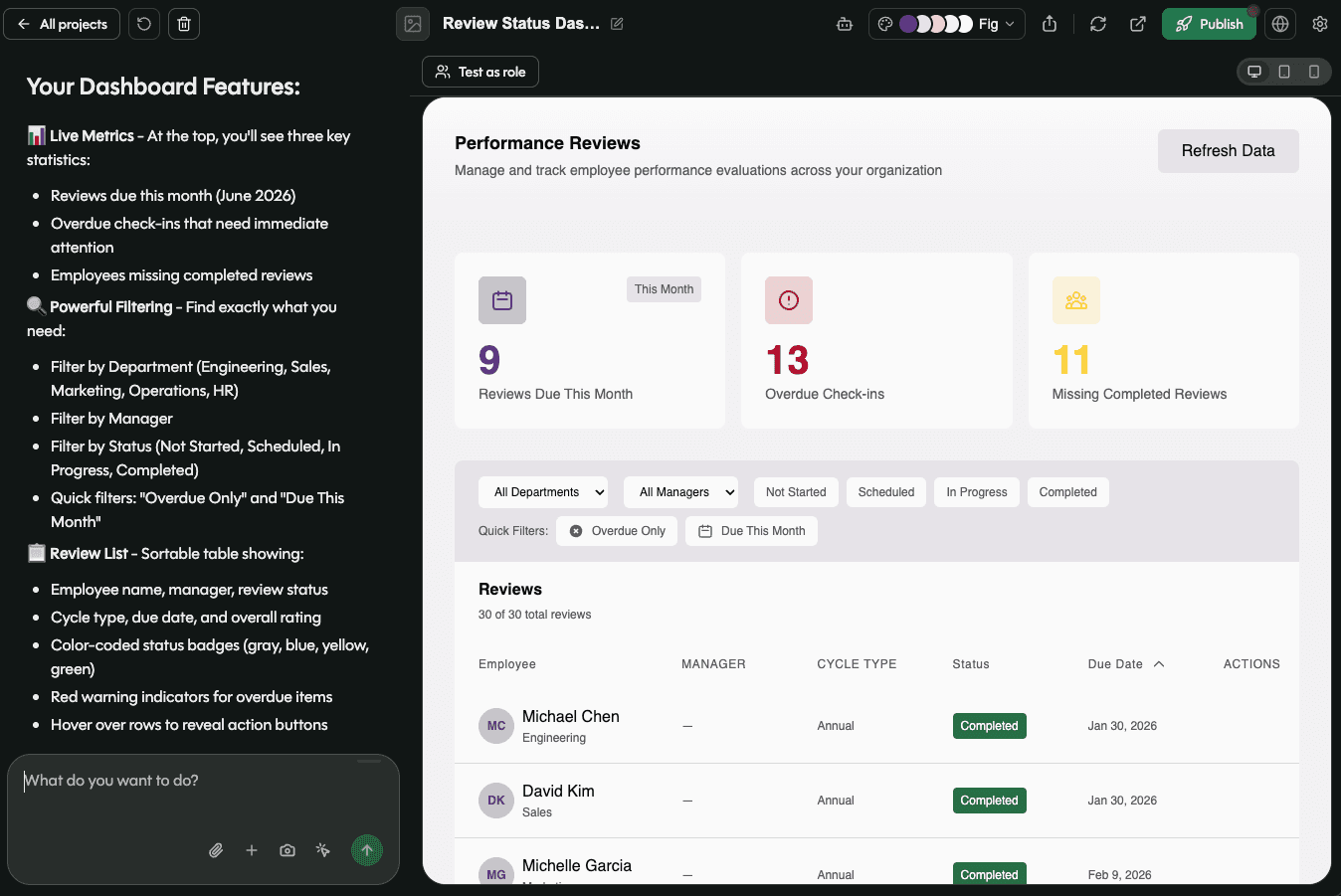
Your team owns the performance review app, end to end.

You describe it, Pave builds it
Describe your review cycle: the forms, the goals, who reviews whom, how a cycle opens and closes. Pave builds the working app. No need for developers.

Yours to shape
Restructure a self-review form, change how goals roll up, or add a mid-cycle check-in by asking. The app tracks reviews the way your team runs them.
.svg)
Governed from day one
Managers see their own team, HR sees the whole cycle, and employees see their own review. You set that from the first record.
One builder, every kind of review.
Fully customizable. Build the review your team actually runs, for any department.
Performance reviews
Annual or quarterly reviews with goals, feedback, and status.
Employee self-reviews
Let employees submit achievements, goals, and reflections.
Manager reviews
Give managers one place for feedback and next steps.
Goals and check-ins
Progress, owners, and due dates rolled up per project.
360 and peer feedback
Collect input from peers, managers, and HR in one record.
Probation and promotion reviews
Run milestone reviews with their own forms and steps.
Your data, hosting, and access, already set up.
Your data, hosting, and access are handled from the first prompt: no database to build, no servers to run, and no login tool to add. Review data stays behind role-based access from the start, and the app holds up as headcount grows, because it runs on Quickbase.

Everything a performance review app needs, built in.

Review forms
Collect self-reviews and manager reviews through forms that land in one record per person.
.svg)
Goals and check-ins
Set goals, track progress, and log check-ins tied to each employee.
.svg)
Cycle status tracking
See who is not started, in progress, submitted, and complete at a glance.

Reviewer assignments
Connect each employee to their manager, HR, or peer reviewers.

Review history
Last cycle’s goals and feedback sit next to this cycle’s, for every employee.

Email notifications
Alert a reviewer when a review is assigned to them.
From a description to a running review cycle.

Describe how reviews work
Tell Pave what you review, who is involved, and how the cycle runs. Start from a text description, a spreadsheet of your current tracker, or a performance review template.
Shape it in your own words
Pave returns an app with review forms, goals, and cycle status already connected. Ask it to add a peer-review step, change a status label, or adjust who reviews whom. Undo to an earlier version if a change isn't right.

Put it to work
Invite managers and employees, set who sees what, and open the cycle. Hosting, data, and access are already handled.
Related use cases
.svg)
.svg)

FAQs
Frequently asked questions
What is a performance management app?
A performance management app is a tool that centralizes reviews, goals, and feedback. Each employee has a record, and their review cycles, goals, and check-in notes are attached and easy to find. Managers can see where their team stands, and last year's review is findable when this year's comes around.
Can I turn a review template into an app?
Yes Describe the form your review uses, question by question, and Pave builds it. You can also import a spreadsheet directly to Pave. The app tracks who has submitted their review, sends reminders when a cycle is open, and keeps every past review attached to the employee.
Can I build my own performance management app?
Yes. Describe your review cycle, what each form asks, and who completes what. Pave builds the employee records, review forms, goal tracking, and permissions. No code, no dev team. Depending on your needs, you could build an employee performance review template in one day. Read more about how Pave works.
What should a performance management app include?
Most teams need a record per employee holding their role, manager, and review history. You also need goals tracked against each person with a status and a due date, and a way to record check-ins through the year. A performance management app should also show managers which of their reviews are outstanding and give HR an overview of completion across the whole cycle.
How does a performance management app connect to existing systems?
Pave offers 350+ native connectors across HR, communication, document, and calendar systems. Set up a connection once and every workflow reuses it.
Is the data in my performance management app secure?
Yes, and governance is a crucial aspect of performance review apps. Role-based access comes with the app,credentials stay encrypted, connections run server-side, and every change waits behind a draft-to-publish gate. Your IT team sees everything n one place, on a foundation trusted by enterprises for over 25 years. Learn more about Pave's security and compliance.