Build a custom work order app that fits your exact process
Describe how work orders come in, who owns them, and how they close. Pave builds a working app that captures every request and tracks each job from new to done.
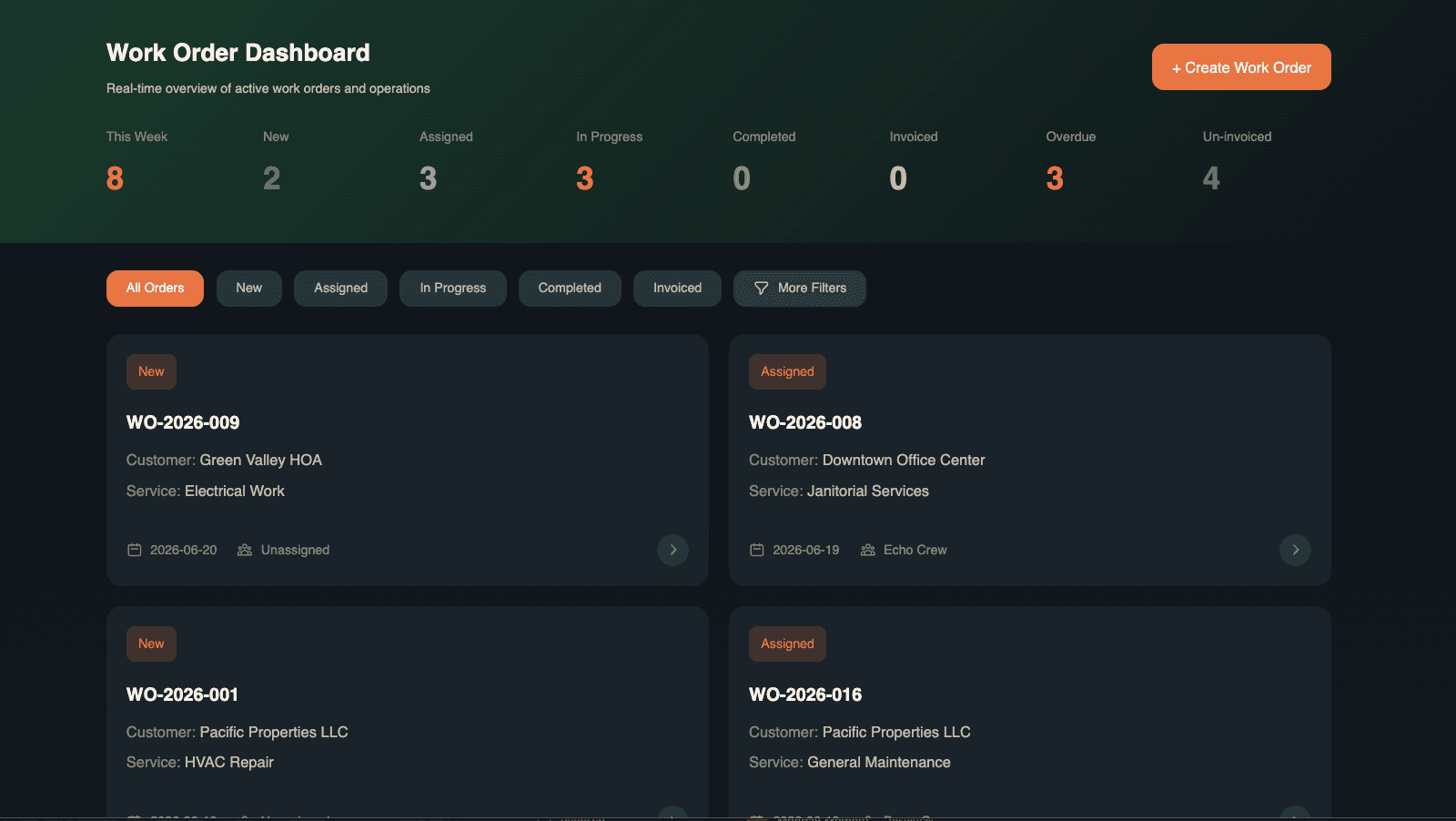
Your team owns your work orders, end to end.

You describe it, Pave builds it
Map how a request comes in, who owns it, and what you track for each job. Pave stands up a working app with the records, forms, and statuses already in place.

Yours to shape
Say what needs to change and it changes: a new priority level, a separate queue for each site, a cost field finance asked for. The app keeps matching how your team runs work, instead of a template you bend to.
.svg)
Governed from day one
A requester sees only what they submitted. A coordinator sees the full queue. A manager sees every site and decides who can edit or close a job. Those lines are drawn before the first work order lands.
One builder, every kind of work order.
Fully customizable. Build the whole work order management app or the one piece you need most: the same app also handles:
Facilities work orders
Repairs and upkeep requests across buildings and rooms, each tied to a location.

IT and equipment requests
Hardware, access, and equipment fixes tracked to a clear owner and status.
Property management requests
Tenant and unit requests logged, assigned, and closed in one place.

Plant and equipment
Machine and line issues tracked against the asset they hit.
Internal service requests
Any team's "please fix / please do" work, with an owner and a status from open to done.
Multi-site operations
The same process run across locations, with each site seeing its own queue.
Your data, hosting, and access, already set up.
Every work order app you build on Pave comes with a managed data layer, hosting, and role-based access in place from the first prompt. There's no database to build, no servers to run, and no separate login tool to add. As more sites, assets, and request types come on, the app holds up, because it runs on Quickbase.

Everything a work order app needs, built in.
.svg)
Intake forms
Capture a request with its site, asset, priority, and description in one form, so every job starts as a complete record.
.svg)
Assignment and ownership
Name who owns each work order and group the queue by site, team, or priority.

Priority and due dates
Flag what's urgent, set a due date, and see what's running late before it slips.
.svg)
Asset and site history
Tie each job to the asset and location it hit, and build a service history for every one.
.svg)
Dashboards and reporting
See what's open, what's overdue, and time-to-close across sites and owners in one view.

Email notifications
Alert an owner by email when a work order's status or owner changes.
From a description to a working approval process.

Describe your wo
Tell Pave how requests come in, who reviews them, and what "done" looks like. Start from a text description, a spreadsheet of past jobs, or the intake form you already use.

Shape it in your own words
You get back an app where each work order record already carries its site, asset, owner, and status. Ask it to add a review step before work starts, split emergency jobs into their own queue, or track cost per job. If a change lands wrong, revert to the version before it.

Put it to work
Invite your coordinators and managers, set who sees and edits what, and start logging work orders. Hosting, data, and access are already handled.
Related use cases


FAQs
Frequently asked questions
What is a work order app?
A work order app turns a request for work into a record someone owns. Each order carries what needs doing, where, who's assigned, and its status from open through complete. The asset or site it relates to sits on the record, so the history stays with the thing that keeps breaking.
Can I build my own work order app?
Yes. Describe what work comes in, what a tech needs to see, and who assigns it. Pave builds the work orders, the assignments, the statuses, and the permissions. No code, no dev team. Most teams can start dispatching real work the same day. Read more about how Pave works.
What should a work order management app include?
An intake that captures the problem, one assignee and a clear status on every order, a link to the asset or site, attachments for photos and documents, and scheduled orders that open on their own for recurring work. You can also build dashboards for what's overdue, what's unassigned, and how loaded each tech is.
Can it handle multiple sites and assets?
Yes. Sites and assets are records in the app, and every work order points at one. That gives you history per asset and per location, plus views scoped by site so a regional manager sees their own without filtering. Techs can be assigned by site, and permissions can be set the same way.
How is this different from a CMMS?
A CMMS is built for maintenance specifically, with asset registries, PM schedules, and parts inventory packaged together. Pave gives you the pieces you actually need. If your work orders are maintenance, build the asset records and recurring schedules alongside them. If they're service calls, installs, or facility requests, build for that instead, without paying for a maintenance module you won't open.
How does a work order app connect to existing systems?
Pave offers 350+ native connectors on every plan. Set up a connection once and every workflow in your work order management system reuses it. A new order notifies the assigned tech, a scheduled job lands on their calendar, and a completed order sends the billable hours to your accounting tool.
Yes. Role-based access comes with the app, so techs see their own assignments, supervisors see their site, and only the right people close an order. Credentials stay encrypted, connections run server-side, and every change waits behind a draft-to-publish gate. Your IT team sees all of it in one place, on a foundation trusted by enterprises for over 25 years. Learn more about Pave's security and compliance.
Is the data in my work order app secure?
Yes. Role-based access comes with the app, so techs see their own assignments, supervisors see their site, and only the right people close an order. Credentials stay encrypted, connections run server-side, and every change waits behind a draft-to-publish gate. Your IT team sees all of it in one place, on a foundation trusted by enterprises for over 25 years. Learn more about Pave's security and compliance.