What Is Database Software? Types, Examples & How to Choose
Database software, also called a database management system (DBMS), helps busiensses create, organize, retrieve, update, and manage stored information so everyone has access to the most recent data.
In this article, we'll explain what database software does through real-world examples, the types of DBMS you'll encounter, and how to decide if your team needs storage, structure, or an app layer.
Key Takeaways
- A database stores records, database software (DBMS) manages them, and a separate application layer gives users a more intuitive way to interact with the information.
- Database types may be categorized by their data model, deployment, architecture, or workload, so it's common for a database to fit more than one overlapping type.
- Database software supports many data functions for a growing organization, but these come with the need for ongoing administration, security, and maintenance.
- Mapping records, their relationships, and how users access them can help you determine whether you need a standard DBMS, an application layer, or both.
Database vs DBMS
The term database refers to the organized collection of stored records, while a DBMS is the tool that manages those records to maintain consistency. A DBMS is also different from the application layer or interface, which presents the data as forms, views, dashboards, reports, and workflows that make it easier for people to act on the data.
So, a team may say they "need a database" when they actually need a DBMS for managing it, an operational interface to view the data, or a consistent process for updating it. A polished application layer or app cannot overcome poorly managed or badly structured data.
What Does Database Software Do?
Database software gives teams a controlled way to store and update shared records, find them later, and connect related information without recreating the same details in every file or version.
Consider a maintenance team at a manufacturer that stores each asset it maintains once and links maintenance work to that asset's record. The DBMS helps keep details from drifting out of sync when records are updated during different workflows (e.g., inspection and operation).
A maintenance operation might use three record types:
- Assets, including asset ID, location, model, purchase date, and service status
- Maintenance tasks, such as task ID, issue, due date, task status, asset reference, and technician reference
- Technicians, including their name, skill area, availability, and contact information
Let's take a closer look behind the scenes of how database software works.
Connected Records in Action
By linking assets, maintenance tasks, and technicians, a maintenance team can store each machine's details in one central record and connect that record to the work performed on it. For example, one CNC machine may have multiple scheduled maintenance tasks throughout the year, with each task assigned to a technician. Over time, one technician can also be assigned to many tasks across different machines.
The asset's location and model live in the asset record once, and a new maintenance task links to that asset instead of requiring someone to rekey the location, model, and identifying details every time they create a work order. If the asset's information changes, the team updates it in the central record instead of hunting through spreadsheets. After the update, linked views and reports can show the current asset information, reducing the risk of typos caused by manually updating information across multiple spreadsheets.
This single source of truth helps ensure all team members see the same information. Teams can also control who can view or change information and apply validation rules to improve data quality.
How an Application Layer Makes Data Usable
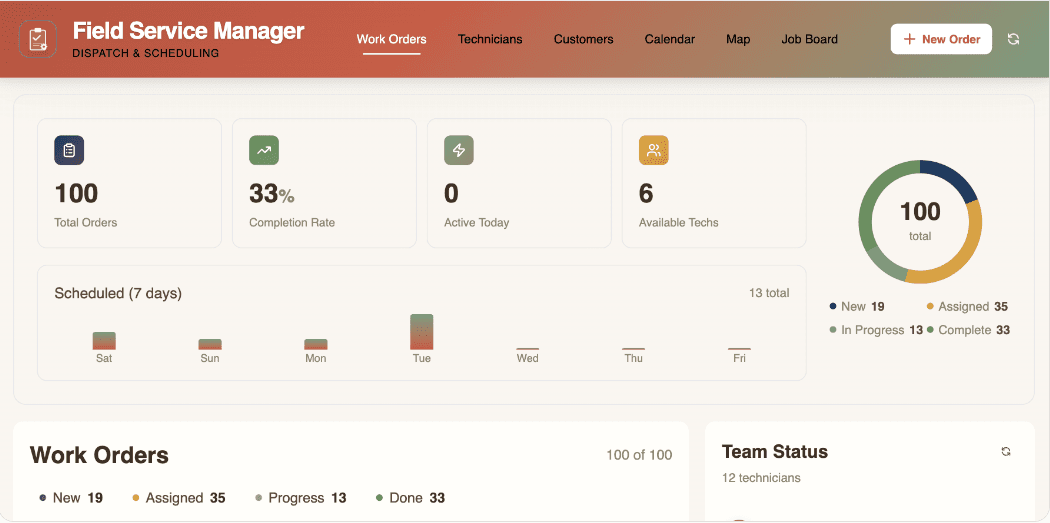
Even when records are stored correctly, people need an application layer that makes the data usable in their everyday work. Stored records alone do not give a technician the interface they need to see assigned tasks, update a status, or log details. An application layer, or app, can provide tools such as dashboards and reports, giving users at-a-glance visibility into overdue work and technician workloads.
Here's how it looks in practice:
When a user changes a maintenance task's status to "complete," the application saves that change to the underlying record in the database. The application layer can then display that updated status in an "Complete" report or dashboard that the technician uses.
Types of Database Software and Examples
Database types can describe different aspects of a database, including how it organizes information, where it runs, how it is deployed, and the workload it supports. Because these categories answer different questions, they may overlap. For example, a database can be relational, cloud-hosted, distributed, and optimized for analytical work at the same time.
Organizational types include:
- Relational databases organize info into related tables and work well when connections matter, such as when one machine can have several maintenance tasks, and each task needs a technician. Examples include PostgreSQL, MySQL, and Oracle.
- Non-relational databases (NoSQL) are an umbrella category for models that do not primarily organize data in traditional related tables. Examples include MongoDB, Redis, and Cassandra.
- Document databases store flexible, document-like records holding nested details. When records may have different structures or nested details, such as equipment inspections with varying notes, measurements, or photo metadata, document databases can be useful. MongoDB is an example.
- Key-value databases store information as unique keys paired with a value and are used for quick lookups, caching, and session data. They generally aren't used for modeling connected operational records. Examples include Redis and Amazon DynamoDB.
- Graph databases record complex relationships among connected entities and help teams trace connections among supplies, machines, locations, parts, and dependencies. Neo4j and Amazon Neptune are examples.
Some other ways to describe databases include:
- Distributed databases, or those that boost performance and redundancy through multiple server locations.
- In-memory databases, which achieve speed by working in RAM, rather than on disk.
- Embedded databases, which run inside an application instead of using a separate server process.
You may also hear "cloud" and "on-premises" as database types, as well. They describe where the database software lives and runs rather than how the information is organized. Cloud databases run through cloud-based, off-site infrastructure, while on-premises databases run on infrastructure that the organization manages itself.
Database Models at a Glance
The right model depends on how the data relates to itself and which questions the team must regularly answer. Teams should start with the information and work they need to support, rather than choosing a technology category first.
Model | How It Organizes Information | Useful for | Example |
Relational | Related tables/records | "Which maintenance tasks belong to this asset?" or "Which tasks are assigned to this technician?" | PostgreSQL |
Document | Flexible, document-like structures | "What inspection details, readings, notes, or photos apply to this machine?" | MongoDB |
Key-value | Each key points to a corresponding value | "What is the current status or last-known reading for this specific machine ID?" | Caching and session-data stores |
Graph | Information emphasizes connections among entities | "How are these people, organizations, assets, or events connected?" | Relationship-mapping databases |
Developers often use more than one organizational type of database in their work. A Stack Overflow survey showed that 55.6% reported using PostgreSQL, 40.5% MySQL, 37.5% SQLite, 28% Redis, and 24% MongoDB.
Database vs. Spreadsheet
Whether a team needs a database or a spreadsheet depends on their size and the complexity of their workflows. Some data needs aren't complex enough to need a database, and a spreadsheet will do just fine. Any small, flexible analysis, such as a personal tracker, one-time calculation, or small working list that changes frequently, could benefit from a spreadsheet.
However, teams outgrow spreadsheets when they need shared records, relationships, permissions, and repeatable operational workflows that require greater control, integrations, or automations. That's where a database can help.
Signs it may be time to upgrade include:
- Multiple people maintain the same list
- Teams frequently make copies of files for different functions or locations
- The same asset, customer, task, or machine number is retyped in multiple locations
- Typing errors have corrupted connections between linked spreadsheets
- Leaders need consistent reports rather than manually combined sheets
- Users need different access levels and permissions
- Workflows benefit from automated follow-up or status notifications
Databases do not necessarily replace spreadsheets altogether. In DATAVERSITY's 2024 survey, 69% of respondents used on-premises relational databases, 67% used cloud-based relational databases, and 66% still used spreadsheets.
There's also no arbitrary threshold, such as a number of row counts or linked tables, to know if it's time to switch (althought spreadsheets do have hard row limits). Complexity of data and relationships matters more. If inconsistent information would lead to major operational fallout, it may be time to consider it.
Key Features of Database Software
Databases store and retrieve information, but they also help users protect and maintain information to keep it useful as the organization (and its needs) grow. Most features can be broken into these five core categories.
- Data structure and integrity: Databases use schemas, field types, validation rules, identifiers, and relationships to keep records consistent.
- Querying and performance: The query language and filtering tools let users get to the exact data they need quickly, while indexes make frequently used searches faster. Administrators can later use monitoring tools to see how data is queried and retrieved, so they can make improvements in storage or resources over time.
- Security and administration: Databases support authentication, user roles, permissions, encryption, logging, and audit trails — all necessary elements of a secure data environment. Administrators can also use database tools to manage, maintain, and monitor these roles and systems to help meet industry standards or legal compliance.
- Backup, recovery, and availability: Data corruption, failure, accidental changes, and attacks can be mitigated through backups and recovery tools. Replication can also improve availability, if needed. Replication should not replace backups because unwanted changes or corruption can also be replicated.
- Integration and scalability: Drivers, connectors, and APIs create pipelines between databases and external software solutions. This helps organizations scale for more users, transactions, or advanced data capabilities, like AI/ML applications.
A DBMS handles these functions, but it doesn't give most people a usable interface. Pave brings everything into one intuitive app that includes an integrated data layer with relationships and version history — plus the screens, logic, and hosting on top of it. Pave's connectors and workflows can also read and write to your existing systems within each user's existing permissions.
Common Challenges of Database Software
As databases grow, software can help manage the data, but it isn't without its challenges. Organizations may find it more difficult to protect sensitive information and maintain data integrity while also supporting more users and maintaining performance. Add in the time-consuming chore of backups, managing permissions, and updating integrations, and it can be too much for some organizations to handle alone.
Pave addresses some of these security and compliance challenges at the application layer through its roles, permissions, encryption, access controls, and governed publishing features. Administrators can manage who has access to what and change it quickly. When processes evolve, teams make easy and fast updates in draft mode and publish when ready.
How to Choose What Your Team Needs
To find the best solution for your workflows, map out the records, relationships, people, and actions involved. Then, you can decide whether the immediate gap is storage, structure, shared access, or an application experience that includes a follow-up process.
Start by mapping one bounded workflow first, such as maintenance management or customer requests, so you know exactly what you need and where to start.
Requirements Checklist
With one mappable process in mind, use this checklist to identify all the data and pathways in your data locations. A clear list of what must be tracked, connected, secured, and acted on shows you whether you need a better spreadsheet, a database, an application, or a combination of the three.
- Records include what you'll track repeatedly, such as assets, projects, customers, tasks, locations, and inventory.
- Relationships include what records connect to other records. For example, one asset may connect to many maintenance tasks, while each task may connect to one asset and one assigned technician.
- Users are those who need to enter, review, update, approve, or report the information, and their roles determine what they see from a dashboard.
- Access determines who can view, edit, approve, or delete different records and fields.
- Data entry rules keep information within preset limitations for format, length, or other traits.
- Imports and existing data identify which data must be migrated or consolidated in the new system and which data can be archived or left behind.
- Follow-up actions include what should happen after a change and can be tied to workflow automations like reminders, assignments, or approval requests.
This is also where you'll document who is responsible for each part of the workflow and ongoing success, and how that success will be measured.
From there, choose the smallest solution that resolves the real operational problem. Add application and workflow capabilities when people need structured ways to act on shared data.
How to Put Your Connected Data to Work With Pave
A database becomes more useful when people have an application for working with the records their business runs on. Pave, the AI app builder from Quickbase, helps teams across industries turn connected data into a fully functional app — no coding required.
Teams can describe their process in plain language and upload any relevant data, such as importing a spreadsheet, PDF, or process diagram. Pave uses that input to create a working application with the data structure, hosting, screens, and logic the workflow needs.
In the maintenance example, Pave projects give each person their own IT-approved view of the same shared data. The technician might use a task-focused view, a coordinator might use a work order form, and a manager might use a dashboard.
Automated workflows also support the follow-up work that happens after a record changes. For example, a team could configure a workflow so that when an inspection fails, the app creates a maintenance task and alerts the appropriate maintenance lead. If your process also involves another system, Pave connectors can integrate with your existing tools and move information between them — whether it's a CRM, accounting platform, service desk, or messaging tool.
Teams can continue refining the draft through chatting with Pave or making direct edits. They can adjust fields, relationships, layouts, formulas, conditional rules, and calculated fields as the workflow becomes clearer. Changes stay in draft mode until the team publishes them, and Pave can roll back to an earlier version if a change doesn't work.
After publishing, you can invite users as Admins, Participants, or Viewers, control access at the app or project level. You can also set up SSO on the Enterprise plan. This lets each person use the same connected operational data through an interface and level of access appropriate to their role.
Build Your First App with Pave
Ready to bring connected data into the workflows your team relies on every day? Map the records your team manages, how they connect, and what each user does next. Then, use Pave to turn your requirements into a custom app that connects your data, automates handoffs, and keeps work moving. Just describe what you need, watch Pave build, and put your data to work.
FAQs
What is the difference between a database and database software?
While a database is the organized collection of information, such as task or technician records, the database software (DBMS) is the tool that helps manage it. A DBMS controls how tasks or records get created, shared, accessed, updated, or protected. A separate application layer can make it easier for users to interact with the information.
When should an organization use database software instead of a spreadsheet?
Spreadsheets are ideal for small, flexible lists or calculations, but they may not provide enough structure and control when multiple people need to access and update the same information. If shared, structured data with connected records is part of your workflows, a database and user-friendly database management software can help you work more efficiently and securely. Learn more about how Pave lets you convert your spreadsheet into an app in minutes.
How does database software work?
Database software works when a user or application sends a request to do something with data, such as retrieve, update, or delete it. The software interprets the request and checks to make sure it can fulfill it, referencing rules, roles, and relationships before taking action. In the case of relational systems, applications may submit SQL queries, which the database engine uses to act on the information.
What are the pros and cons of database software?
Database software can support centralized, consistent records with less duplicated or conflicting information. It can connect related records or even external applications. For large volumes of data and growing organizations, it can help them scale and maintain user roles, permissions, and access to modern integrations.
With each benefit or feature, there's also the need for maintenance, management, and review. Data management is a responsibility with many moving parts that organizations must take seriously to keep data secure and maintain its quality.
Is SQL a type of database software?
No, SQL is a standardized language that helps users define, query, and manipulate data in relational database management systems. Software that supports SQL includes PostgreSQL, MySQL, Microsoft SQL Server, Oracle Database, and IBM Db2.
Can I build my own database software without coding?
Yes, with Pave you can simply describe your process and upload your existing data. Pave will turn your requirements into a custom app that you can tweak till it fits your workflows perfect. Pave will organize data, manage records, and automate workflows between your existing systems without writing a single line of code. Learn more about what vibe coding is, or dig into how Pave works.
How much does it cost to build my own database software?
It depends. The cost of building your own database software varies based on the complexity of your requirements, what features you need, and whether you build it yourself or hire developers. Using an AI app builder like Pave can help reduce dev time and costs by letting you create custom database apps and workflows without writing code. Learn more about how much it costs to build an app.

Written by:Mikala Holmgreen