7 Base44 Alternatives & How They Compare for Business Tools
Base44 is designed for non-technical builders who want full control over their app. But as those apps grow, so does the complexity of maintaining them. You're stuck managing permissions, configuring security, troubleshooting issues, and keeping your apps running.
The top alternatives to Base44 include Pave, Lovable, Replit, Bolt.new, Glide, Bubble, and v0. We tested each one to compare functionality, pricing, ease of use, governance, and more. If you're researching apps like Base44, we've got you covered.
Key Takeaways
- Pave is the most direct alternative for business teams because roles, governed publishing, and draft-to-publish controls come built in.
- Glide differs from Base44 in its starting point. Glide builds from spreadsheet data you may already use.
- Replit, Bolt.new, and v0 give you code access that Base44 only partly matches, but they require more technical comfort to fix and deploy.
- Lovable and Bubble are closest to Base44 in how they build, but they lean more toward polished, design-led front ends.
Our Methodology & Findings
We gave each tool the same prompt: a work order app where office staff create and assign jobs, crew leads update status, crew members see only their own schedule, and clients see only their own work orders. We evaluated what each tool asked of us before building, how quickly it produced an app, whether we could test each role's view, and how much effort it took to build a working task tracker.
To see what each tool produced, check the screenshot in each tool's overview below.
Base44 (baseline) built a working app without asking clarifying questions or requesting approval, so the app needed more edits. Its first screen didn't show what needed attention, the schedule was hard to follow, and it was difficult to see what was done and when. The builder wasn't tailored to this use case, so we had to supply a clear plan to handle the details, and permission levels weren't set up by default and were hard to check.
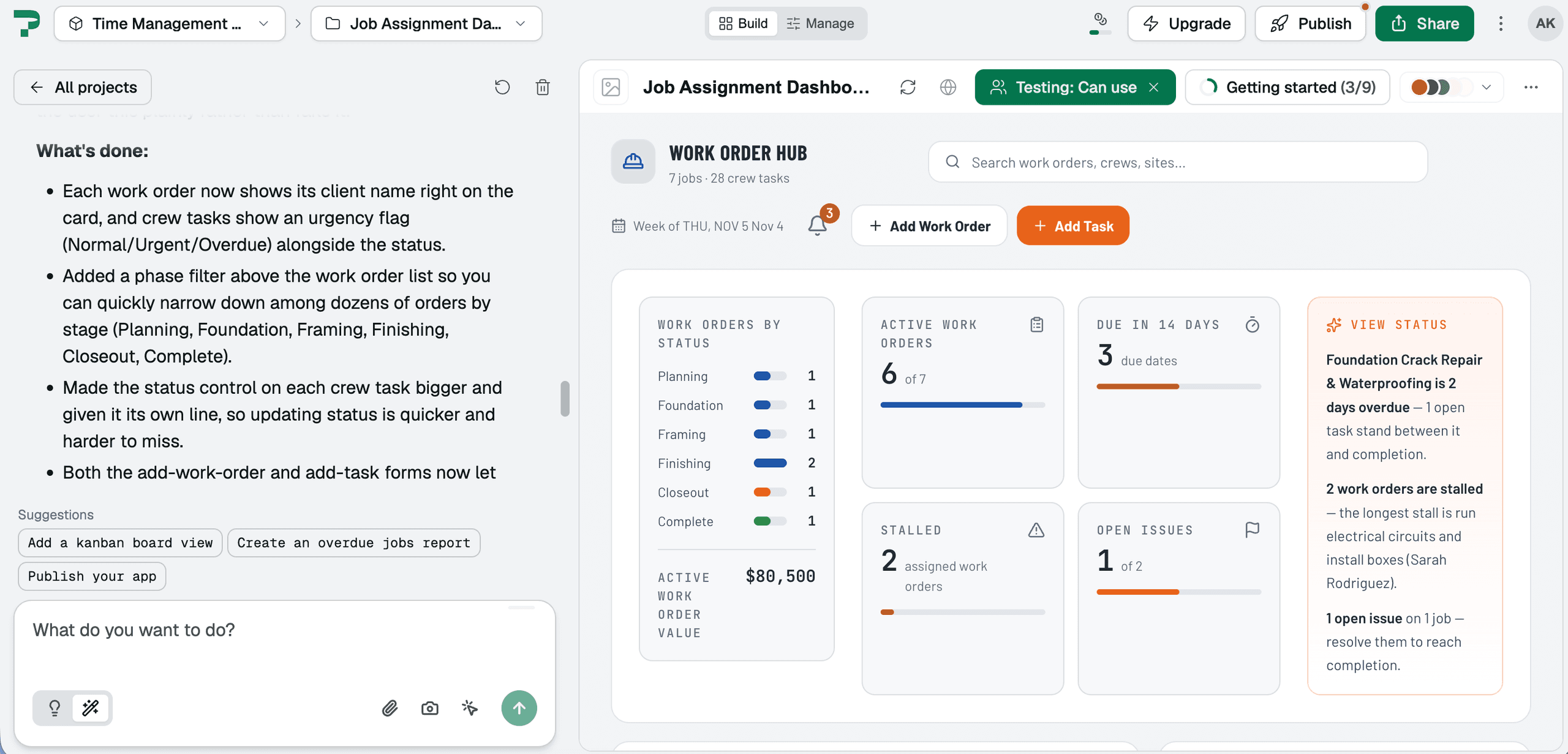
Pave asked five clarifying questions and offered an initial plan that we could approve or revise, plus two app screens to choose from. The app came ready with setup complete and an app tour, and its first screen focused on what needed attention, the priority we named in a follow-up question. Permission levels were easy to check across roles, which Base44 didn't offer by default.
Replit asked us to choose an output type first (such as a website, mobile app, or design), then requested an email before granting access to the app. Generation took a while, and the result was a marketing-style landing page with copy and a call to action to sign in to the workspace, which made it less clear how to test the app. The first app didn't work as expected, and we fixed it by prompting. Replit had more difficulty than Base44 with the access-level details, though its interface had a cleaner look.
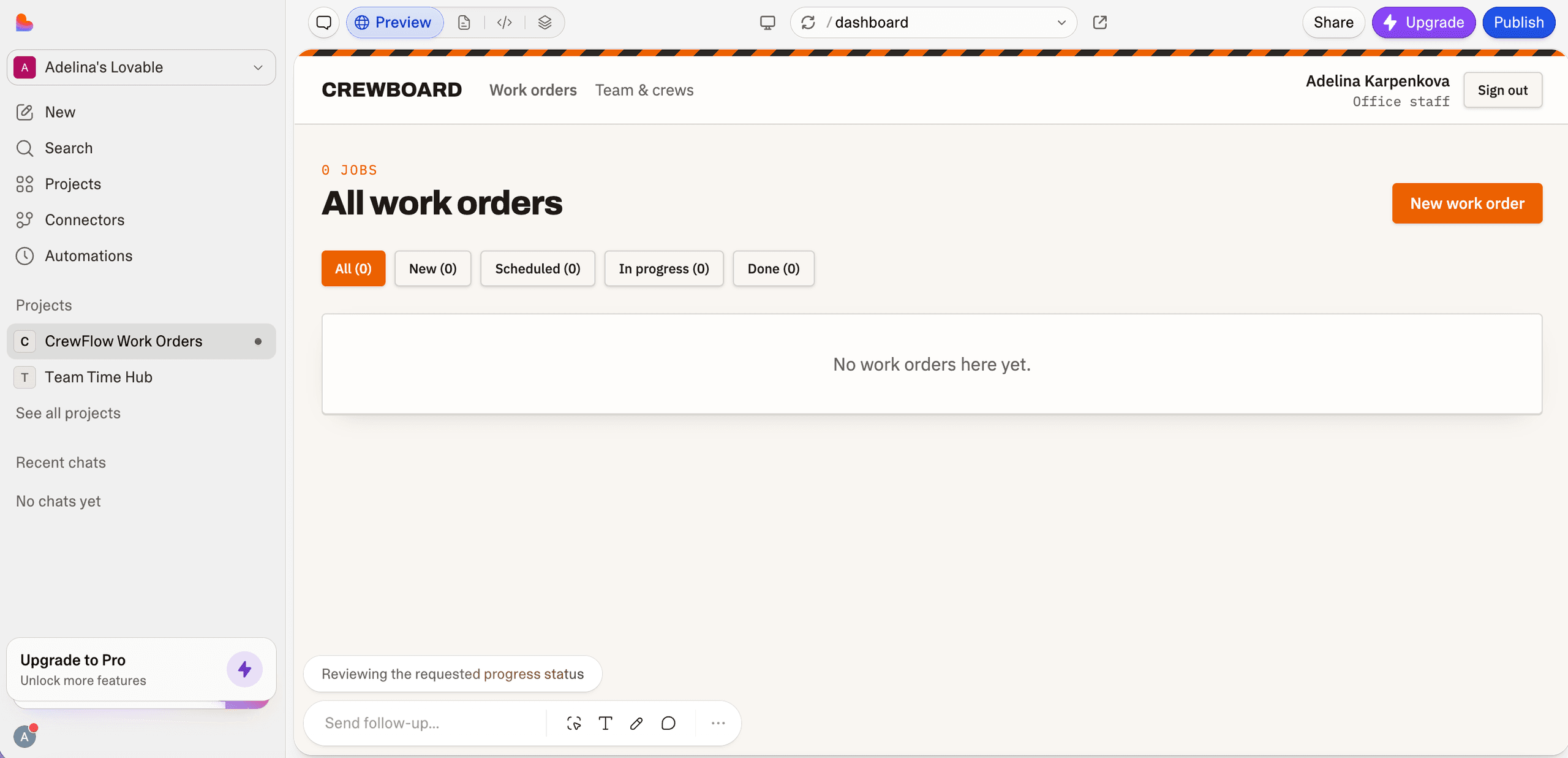
Lovable asked clarifying questions before building, unlike Base44, but the screen stayed idle during generation so it wasn't clear the build had started. The first screen was a design-led landing page closer to a traditional marketing site than an internal tool. Our free credits ran out during the first generation, and the task tracking view at sign-on was very basic, likely because no credits were left to build more.
Bolt.new started building without clarifying questions, similar to Base44, and the page became unresponsive. We didn't reach a result in three attempts. In a later run, it listed four test roles on the app's own screen, but login failed until prompting uncovered missing authentication setup. Finding the root cause took time, and we ran out of tokens before access worked.
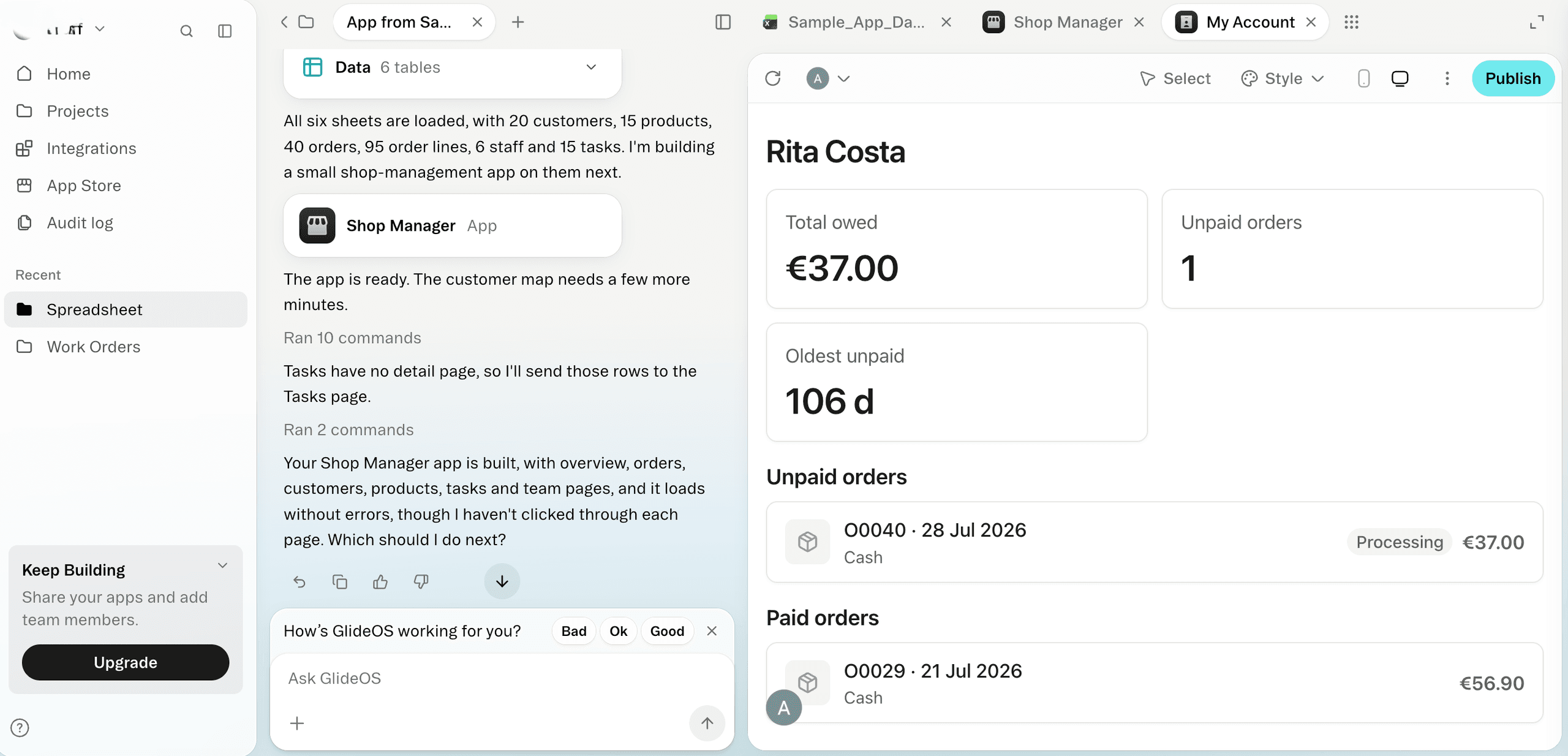
Glide asked one question upfront about where the app's data would come from and opened on a tracker screen that fit the use case more logically than Base44's. Neither tool offered role testing by default. We had to ask for roles as a follow-up, and even then role testing only appeared after we asked again, when it added a toggle. The starting point was simple, with a few tabs and several ways to filter and view tasks, but it needed more work.
Bubble didn't ask clarifying questions, but it produced a detailed plan by features and scenarios for approval, which Base44 didn't offer. Its first screen read like a long marketing homepage with "Get started" and "Login" buttons, and the later screens were limited, needing substantial work to become an internal task tracker. Role testing wasn't convenient on the first try, and the app felt clunky compared with Base44, though we had no sign-in problems on first access.
v0 by Vercel asked us to connect a Git repository, then asked for a database, which Base44 doesn't require because its database is built in. We skipped the database step, and v0 still built a demo app with pre-built views for each role and custom screens. Beyond connecting services and deploying, the app needed very few edits.
Base44 & Alternatives at a Glance
Tool | Best For | What You Get | Free Plan | Paid Plans |
Base44 | Solo builders and small teams who want a self-contained app from a prompt | A managed app with its own database, logins, and hosting, plus code editing on paid plans | 25 message credits and 100 integration credits a month | Starts at $20/month |
Pave | Business teams that need to run a process after app launch | A managed business app with roles, governed publishing, and hosting, with no code to manage | 1 app, 1 builder, up to 3 users, and 100 credits | Starts at $20/month |
Lovable | Marketers and solo builders looking for polished front ends | A React app with a Supabase backend, with code you can export to GitHub on paid plans | Five credits a day | Starts at $25/month |
Replit | Learners and makers who want to start with prompts and grow into code | A full project you can edit, export, and deploy, including mobile apps | Starter plan with daily Agent credits | Starts at $20/month |
Bolt.new | Non-technical founders who want a quick browser prototype to test an idea | A full-stack web app with a Supabase backend and code you can download or sync to GitHub | 1 million tokens a month, with a 300,000-token daily limit | Starts at $25/month for 10 million tokens |
Glide | Teams that already track work in spreadsheets or Airtable | A managed no-code app for mobile and web, with workflows on paid plans | Draft apps, but no publishing | Starts at $25/month with one published app |
Bubble | Builders making public-facing products like SaaS apps or websites | A managed web or mobile app built in Bubble's visual editor, with no code export | Development use only, with no live publishing | Starts at $32/month |
v0 by Vercel | Teams and non-technical builders who want a web app they can move into production with some setup help | A Next.js project with generated code, GitHub integration, and Vercel deployment | $5 in monthly credits and a daily message limit | Starts at $30/user per month |
Product and pricing information: vendor product and pricing pages, November 2026.
Why Businesses Look for Base44 Alternatives
Base44 makes it easy to build a first working app, but the trouble starts with iteration and updates. As we discovered when we wrote our Base44 review, many users report getting stuck in loop of fixing issues and spending more credits than they expected.
We found the same problems repeated across user feedback:
- AI doom loop: A Trustpilot user reported that simple issues often took several attempts to fix, and some never got resolved.
- Failed attempts crowd out context: The debris from abandoned approaches fills the agent's working memory, per the G2 review.
- Costs climbing with each fix: A Trustpilot reviewer said the looping logic burned through integration credits, and the prompts to upgrade led them to pay for higher plans. Base44 pricing is built around credits, so a build that needs several rounds of fixes can use far more of them.
When every fix goes through a prompt, even a small change costs credits and can start the fixing loops described above. That's why our list favors tools that also let you make minor adjustments directly. Tools with code access, such as Replit, Bolt.new, and v0, usually don't offer drag-and-drop layout editing, so small fixes either go through prompts or require coding. Tools like Pave's visual canvas and Bubble's visual editor let you adjust the app directly, so a minor fix doesn't have to become another prompt loop.
The 7 Best Base44 Alternatives
We evaluated Base44 competitors to determine which help business teams build apps with AI that they can set up quickly and make updates to as needed.
Note: This list leaves out code editors built for developers, such as Cursor, because it is written for business teams. Check out Pave vs Cursor to see how they compare.
1. Pave: The Best Base44 Alternative for Business Teams
Pave is a user-friendly AI app builder for business teams. Like Base44, Pave lets you describe a process in plain language and builds the app's data, logic, and screens. The difference is governance. According to our State of Employee-Built Apps report, role-based access is the most common requirement leaders set before an employee-built app can be used more widely (57%). Pave builds those controls in from the start, while Base44 needed extra setup to get the same controls in place.
Our findings: Pave built a complete app in about five minutes, with screens tailored to the process we described. It also applied business process practices, such as role-based access and clear job status views, without us having to ask. Base44 produced a more basic app from the same prompt.
Pave Features
- Plain-language building: Describe the workflow, and Pave generates the data model, forms, and logic.
- Data import: Start from an existing spreadsheet or PDF if you have your process documented.
- Planning mode: The agent asks a few clarifying questions, outlines a plan, and waits for your approval before using any credits to generate the app.
- Flexible editing: Request changes in the chat or use the Direct Edit feature on the visual canvas.
- Field-level permissions: Control who can view and change each part of the app, down to individual fields. Enterprise plans add single sign-on and multi-factor authentication.
- Role-based testing: You can switch between role views to see exactly what each person on the team sees and can change.
- Connector library with automated workflows: Pave connects to more than 350 tools, including Salesforce, QuickBooks, Slack, Jira, and more. You can also set up custom workflows to automate the processes between your tools.
- Draft-to-publish gate: App changes stay in draft until you're ready to publish them.
- Governance and security: Apps run on Quickbase's secure infrastructure, trusted by thousands of enterprises for more than 25 years.
- Hosting and deployment: Pave offers fully managed hosting, so there's no separate deployment to manage.
Pricing
As of this writing, Pave's free plan includes one app, one builder, up to three users, 100 credits, hosting, and draft-and-publish, with no credit card required. Paid plans start at $20/month with 120 credits a month and up to five apps. Credits pay for AI building and changes, agents, and automations, but everyday actions like adding data or inviting users don't use any. Check out Pave pricing.
Pave vs Base44
- Great for inexperienced builders: Pave asks clarifying questions and presents a plan you can approve or revise before it builds. In our test, Base44 built from the work order prompt without questions, and we spent time untangling its assumptions.
- Planning and credit spend: When you're unsure what you need, Pave generates several screen options to choose from. In Planning Mode, Pave only spends credits after you approve the plan. Base44 offers a discussion mode and a building mode, but you don't get to see visualization options beforehand.
- Code: Base44 offers GitHub sync on its Builder plan and above for changes merged into the main branch. Pave keeps the app on its platform, so there's no code to manage.
- Governance and roles: Pave apps are ready to deploy with roles and governed publishing built in, and we could switch between role views to check what each permission level saw. Base44 also goes live without extra database or hosting setup, but in our test its permission levels weren't ready for testing by default.
Choose Pave if you need an app for a team process that controls who can see and edit each part from day one.
2. Lovable: The Closest Prompt-to-App Swap
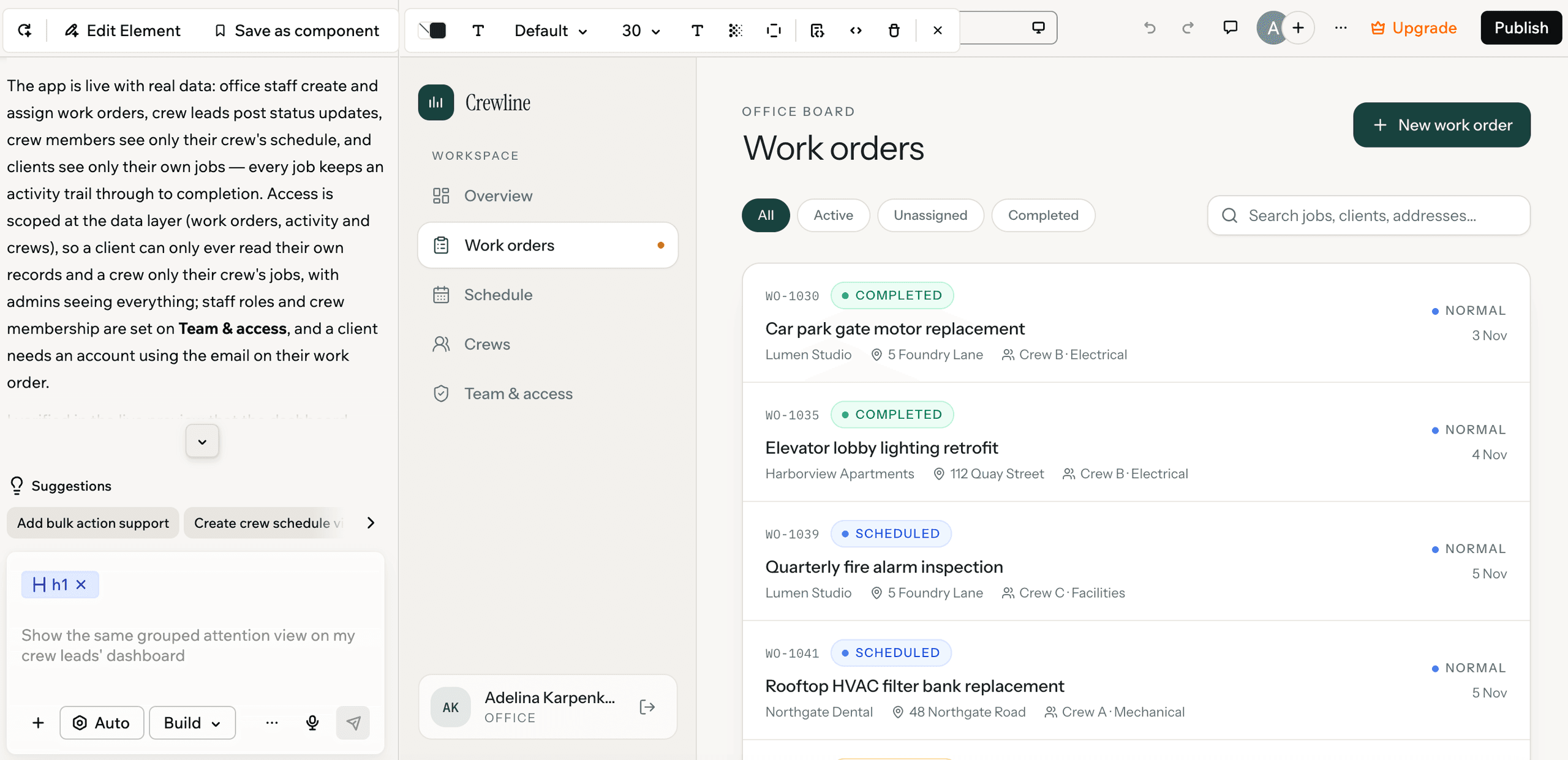
Lovable also turns a prompt into a working app. It leans toward more polished, design-led interfaces and public-facing pages. If you have developers, you can take the code into your own codebase.
Our findings: During our experiment, Base44 felt heavier, with a stronger focus on full-stack apps, while Lovable felt lighter and more focused on marketing-style interfaces. Beyond that, the two tools are very similar. Neither offers drag-and-drop editing, only style changes.
Lovable Features
- Prompt-to-app building: Describe the app in plain language, and Lovable generates the interface and backend.
- Plan Mode and Chat Mode: Chat Mode discusses the project without changing code, and messages draw first from a daily chat allowance. Plan Mode lays out the approach before building and costs 1 credit per message.
- Visual design: Lovable generates polished layouts and landing pages from a prompt.
- Live voice in apps: You can build two-way spoken conversations in Lovable apps.
- Code access: Paid users can edit code directly in the project editor through Dev Mode. Free users can't edit code in the editor.
- GitHub sync: Paid plans sync projects to GitHub, so developers can move the code into their own workflow.
- Connector library: Lovable offers a larger connector library than Base44, including Linear and Notion.
- Access controls by plan: User roles and permissions start on Pro, SSO comes with Business, and audit logs with Enterprise.
Pricing
As of this writing, Lovable's free plan gives you five credits a day, up to 30 a month. In our testing, it was enough for the first screen of an internal app with a basic structure behind it. Paid plans start at $25/month and include 100 credits a month. Current plan details are on Lovable's pricing page.
Lovable vs Base44
- Database: Base44 includes its own NoSQL database. Lovable runs its backend on Supabase through Lovable Cloud.
- Credits: Base44 splits credits into message credits for building and integration credits for actions in the live app. Lovable uses one balance for building, hosting, and AI calls.
- Code: Base44 offers GitHub sync on its Builder plan and above, for changes merged into the main branch. Lovable gives paid users code access and GitHub sync, and its code is yours to take with you.
- Connections: Lovable's connector library is larger, and integration actions don't draw from a separate credit pool, though the app's backend and AI calls do.
Choose Lovable if you want a polished public-facing site or branded front end. If you're looking to build smarter business tools, check out these Lovable alternatives or see our Pave vs Lovable comparison.
3. Replit: Best for Building with AI Agents and Code
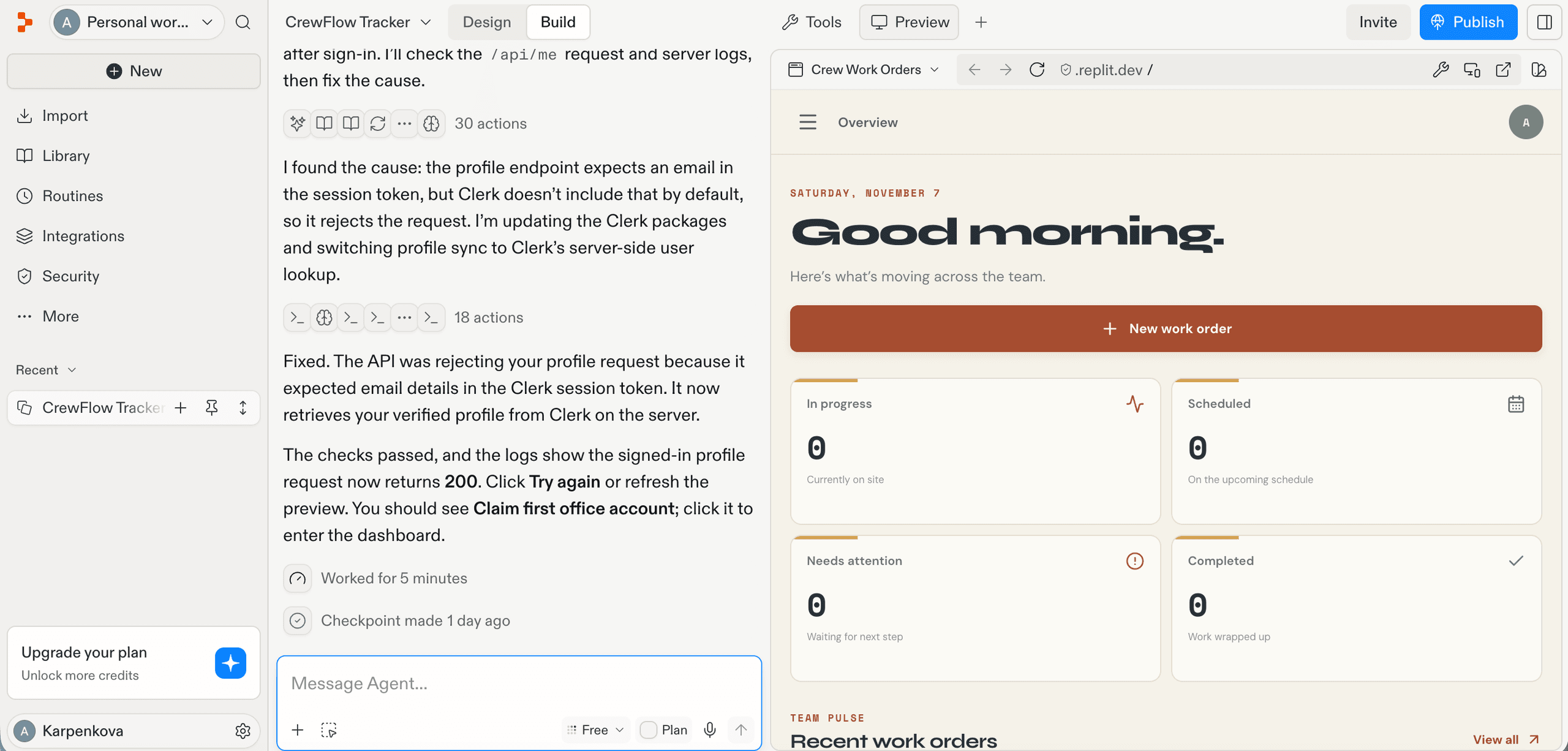
Replit suits people who are comfortable with code and want the ability to see and edit every file in the project. You can build by prompting alone, as you can in Base44, but if you need a custom app that a business team runs without touching code, Replit will likely be harder to work with.
Our findings: Replit's first app didn't work as expected, and we managed to prompt it for fixes. Replit had more difficulty than Base44 with the access-level details in our initial prompt, though its app interface looked neater.
Replit Features
- AI Agent: The Agent writes, runs, and deploys an app from a description.
- File tree and code editor: Every file in the project is visible and editable.
- Mobile apps: Replit can build iOS and Android apps.
- Console: The app's output and errors are shown as it runs.
- Git panel: Changes are tracked and kept in sync with a GitHub repository.
- Free Mode: Core and Pro users can do everyday Agent work without spending credits, within an allowance.
- Code export: Projects can be exported as ZIP files or pushed to GitHub.
- Deployment: Each deployed app gets its own web address.
Pricing
As of this writing, Replit has a free Starter plan that includes daily Agent credits, though the exact daily amount isn't clear from Replit's public information. Core starts at $20 a month and includes monthly credits, and each Agent request is billed by how much work it takes, so costs are hard to predict upfront. Check Replit's pricing page for current plan details.
Replit vs Base44
- Code access: Base44 lets you edit code on its paid plans and sync to GitHub on the Builder plan. Replit gives you the full project workspace from the start, including the file tree, editor, and Git panel.
- Setup: Base44 includes a database, logins, and access control inside the app. Replit leaves more setup decisions to you, which suits developers and less suited to a team that wants everything ready at once.
- Cost: Base44 uses message and integration credits. Replit's effort-based billing can make larger builds harder to predict.
- Visual appeal: In our test, Replit's app looked more visually polished than Base44's.
Choose Replit if you're comfortable with code and want full control over an app's files, its deployment, and its Git history. If you prioritize a speed-to-working app, see Pave vs Replit.
4. Bolt.new: Best for Quick Prototypes in Your Browser
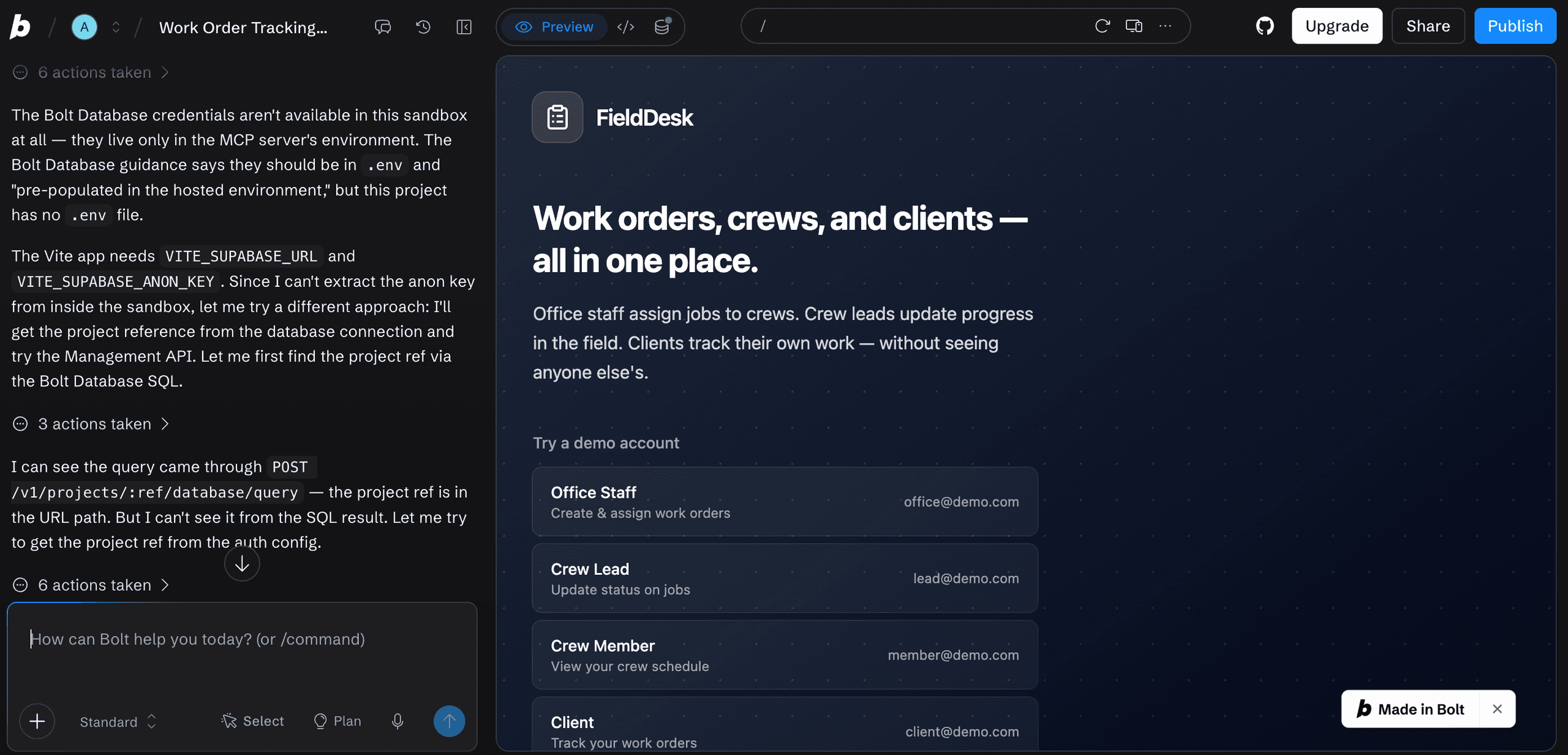
Bolt.new is a prompt-to-app builder that supports code editing. It generates full-stack web apps in the browser, sets up a Supabase backend by default, and lets you download or sync the project to GitHub. Compared with Base44, its main advantages are its developer focus and stronger Git connectivity, while many other features are similar.
Our findings: Bolt.new started building without asking clarifying questions. The page became unresponsive, which matched our experience in a previous test when we evaluated Bolt alternatives. Bolt.new's app listed four test roles on screen, but login failed until prompting uncovered missing authentication setup, and we ran out of tokens before access worked.
Bolt.new Features
- Prompt-to-app building: The app is generated in the browser from a plain-language prompt.
- Supabase backend: A Supabase database and authentication are set up by default, or you can connect your own project.
- Plan mode: You can discuss the app before building it, and this costs fewer tokens than making changes.
- GitHub sync and ZIP download: Projects can be synced to GitHub or downloaded as a ZIP file.
- Framework choice: Apps can be generated in frameworks such as React, Vue, Svelte, and Expo.
- Mobile apps: You can request a mobile app in the prompt, and Bolt.new sets up an Expo project for mobile.
Pricing
As of this writing, Bolt.new has a free plan with 1M tokens a month and a 300,000-token daily limit, which includes Bolt branding. Pro costs $25/month for 10 million tokens, with no daily limit, and unused tokens roll over. Tokens count the text the AI reads and writes. Check Bolt.new's pricing page for current plans.
Bolt.new vs Base44
- Code access: Bolt.new leans toward technical builders and rewards direct code edits. Base44 users can build without touching code.
- Framework choice: Bolt.new generates apps in React, Vue, Svelte, or Expo. In Base44, framework choice applies only when you use its backend as a standalone service.
- Git sync: Bolt.new makes it easier to sync a project to GitHub and take the code with you.
Choose Bolt.new if you want to prototype a web app to test before a developer takes it further. If you'd rather not deal with the code, see our comparison of Pave vs Bolt.
5. Glide: Best for Internal Apps on Spreadsheet Data
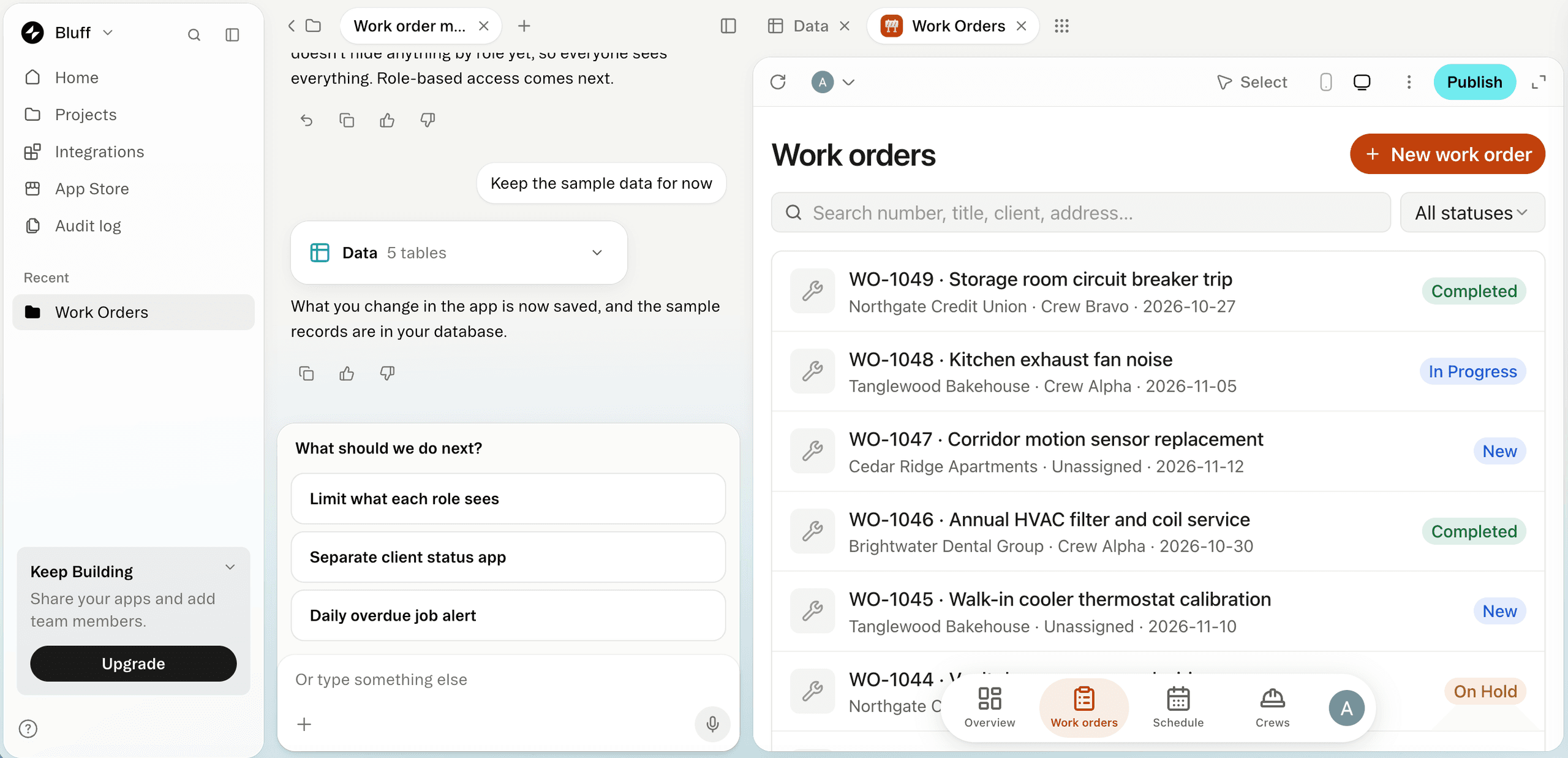
Glide is a no-code builder that turns spreadsheets and databases into mobile and web apps. It has two products: Glide Classic is the original builder, built around tables and logic; GlideOS is a newer AI-assisted builder that turns a spreadsheet into an app. The two have separate accounts and billing, and an app built in one doesn't move to the other. Unlike Base44, Glide doesn't offer code editing.
Our findings: Glide produced a more logical app for the use case than Base44's, with a tracker screen that fit the work. Neither tool offered role testing by default. In Glide, we had to ask for roles as a follow-up, and even then it didn't provide role-based testing until we asked again, when it added a toggle.
Glide Features
- Data sources: Apps use Glide's own tables on every plan, with Google Sheets and Airtable on paid plans.
- Visual editor: Layouts, data bindings, and logic are set up visually, without writing code.
- Mobile and web: Apps run on phones, tablets, and desktops from one build.
- Workflows and integrations: Paid users can automate actions and connect third-party tools.
- Filtering and views: Users can filter and view records in several ways, as our test showed.
Pricing
As of this writing, Glide Classic's free tier lets you build draft apps, but you can't publish them. The first paid plan costs $25/month and includes one published app. Glide's pricing depends on signed-in users, connected data sources, and the number of rows your app stores. Check Glide's pricing page for current figures.
Glide vs Base44
- Data: Glide offers its own tables or connects to spreadsheets and Airtable bases you may already use. Base44 includes a built-in NoSQL database.
- Code: Glide doesn't offer code editing, so it suits builders who want to avoid code entirely. Base44 lets you edit code on paid plans and offers a standalone backend for developers.
- Cost: Glide charges by users, data sources, and updates. Base44 uses message and integration credits.
- Builder experience: Glide made useful suggestions that moved us toward a working app. Base44 gave less guidance, which may leave business teams without the direction they need.
Choose Glide if your team already tracks work in Google Sheets or Airtable and you want a no-code app that works with that data. Want more options? Check out these Glide alternatives.
6. Bubble: Best for Full Visual Control, Including Native Mobile
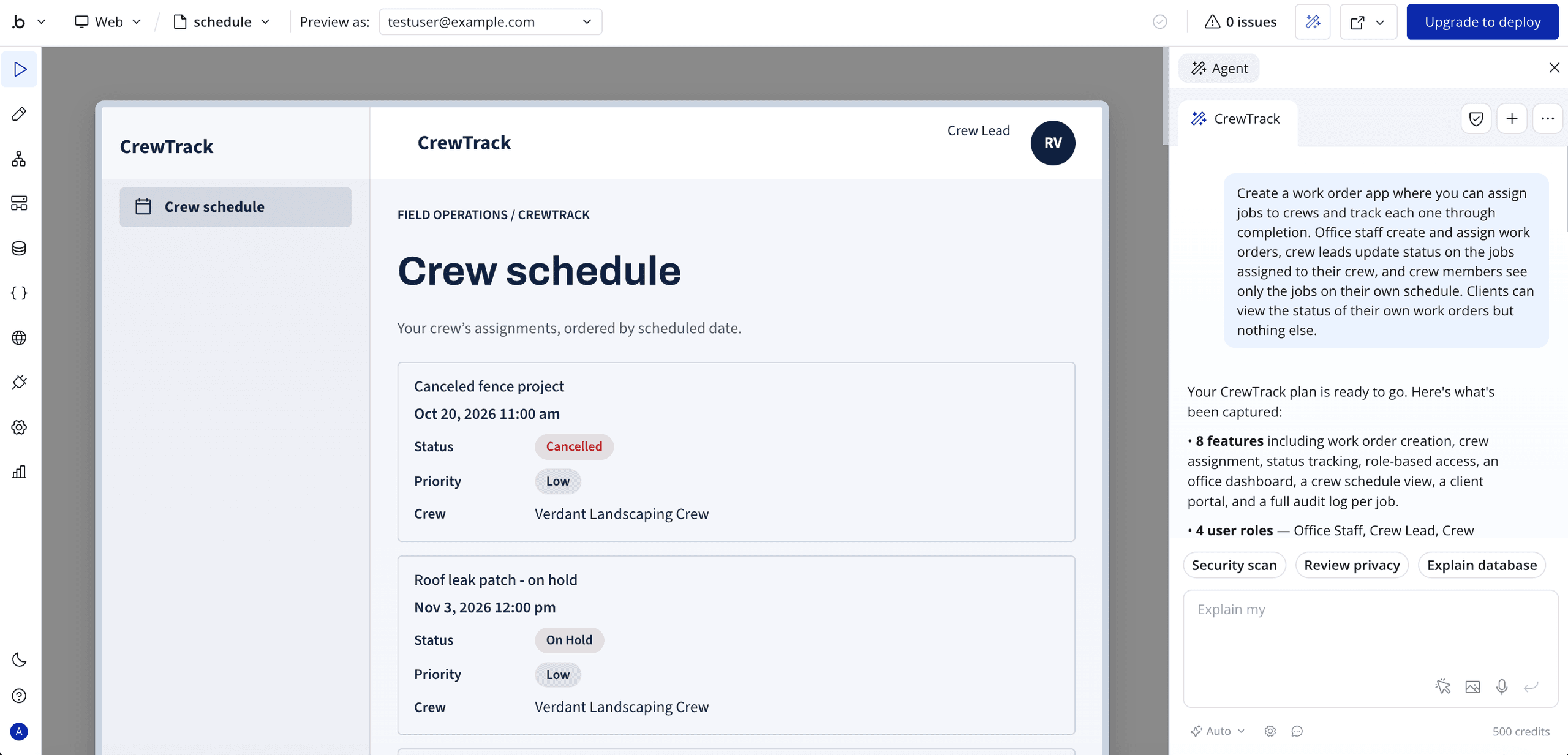
Bubble is a prompt-first builder for web and mobile apps. You describe what you want, and Bubble generates the pages, database, and workflows, then you refine them in its drag-and-drop editor. Like Pave and Glide, Bubble doesn't offer code access, which distinguishes it from Base44.
Our findings: Bubble's app didn't offer role testing from the first try and felt clunky compared with Base44. Unlike several other tools, we had no sign-in problems on first access. Both Bubble and Base44 needed substantial rounds of iterations to build a working task tracker.
Bubble Features
- Plain language builder: Describe the app, and Bubble generates a first version.
- Visual editor: Layouts and screens can be adjusted with drag and drop.
- Visual logic: Workflows and conditional rules can be set up in the builder to define how the app behaves.
- Built-in database: App data is stored and managed inside Bubble.
- Plugins and API Connector: Outside services can be connected without writing code.
- Mobile apps: Free and paid users can build native iOS and Android apps, but publishing to app stores may require a paid mobile plan.
Pricing
As of this writing, Bubble lets you build an app without publishing it. Paid web plans start at $32/month, and mobile or combined web and mobile plans cost separately. Bubble's costs are based on workload units (WUs), which track the server resources your app uses, so they rise as usage grows. AI credits are a separate balance and cover features such as generating images and pages. Check Bubble's pricing page for current figures.
Bubble vs Base44
- Planning: Bubble gave us a plan to approve before building, while Base44 started building from the prompt without asking questions.
- Code access: Neither tool requires coding. Bubble doesn't export source code, so you build and run everything inside its platform. Base44 lets you edit code on paid plans, but you don't need technical experience to build an app.
- Mobile app: Bubble offers native iOS and Android builds to free and paid users. Base44 apps can be submitted to the App Store and Google Play as a wrapped web app, but they don't support native-only features such as push notifications or full offline use.
- Cost: Bubble uses workload units, which rise with app activity, plus separate AI credits. Base44 uses message and integration credits.
Choose Bubble if you're building a public-facing product, such as a SaaS app or a website. If you need built-in roles and secure infrastructure from the start, see the full Pave vs Bubble comparison.
7. v0 by Vercel: Best for Front Ends in Production
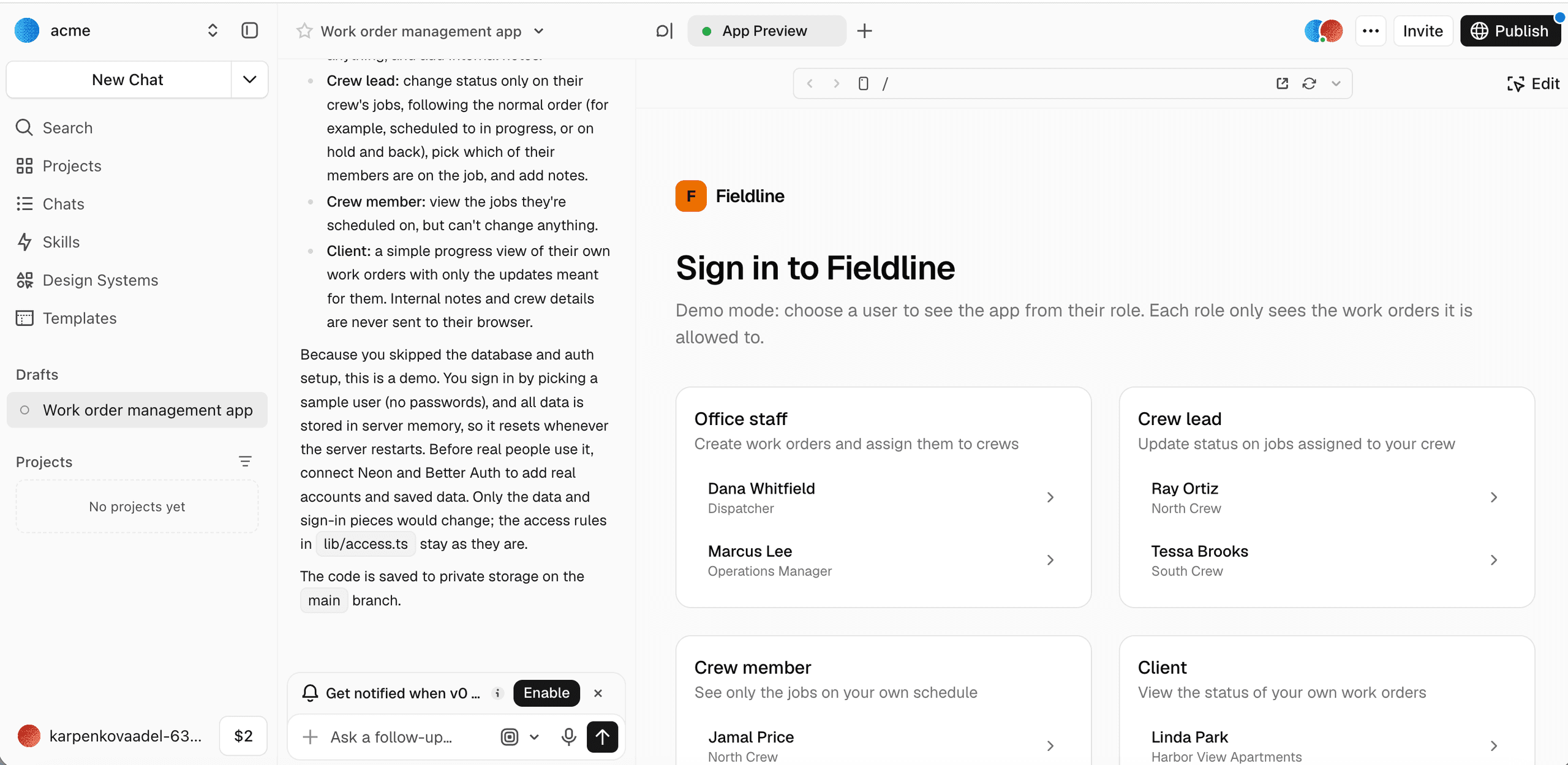
v0 is an AI builder you can use without writing code, but having some technical experience is better with this tool because you build most of the app through prompts and visual edits. Database connection and deployment to Vercel require some technical comfort, so v0 suits users comfortable handling those steps themselves.
Our findings: Unlike Base44, v0 pushed us to connect a Git repository and a database before building, but it still produced a working demo without one. It included pre-built views for each role to test, and the app needed few edits beyond connecting services and deploying.
v0 Features
- Plain language builder: You can describe a screen or app, and v0 generates the interface and code.
- Design mode: You can make visual changes to the interface without writing code.
- Next.js and shadcn/ui output: Generated code uses React, Tailwind CSS, and shadcn/ui components by default.
- Full-stack previews: Previews handle server-side features such as API routes and database connections.
- GitHub integration: You can import existing repositories and create branches and pull requests from the chat.
- Vercel deployment: Apps deploy to Vercel directly.
Pricing
As of this writing, v0 has a free plan with $5 in monthly credits and a daily message limit. Paid plans start at $30 per user a month and includes $30 in credits per user, with shared credits and centralized billing. Check v0 pricing for current costs.
v0 vs Base44
- Database: v0 asked us to connect a database, which could be skipped to create a mockup project. Base44 includes a built-in database.
- Roles: In our test, v0 provided pre-built role views to test. Base44 didn't set up role testing by default.
- Code: v0 generates Next.js code and connects to GitHub, so developers work with the code directly. Base44 lets you edit code on paid plans.
- Deployment: v0 deploys to Vercel, while Base44 hosts apps as part of its platform.
Choose v0 if you want a working app quickly, need role views to test, and are comfortable connecting a database and deploying to Vercel.
Buyer's Checklist: What to Look for in a Base44 Alternative
The right Base44 alternative depends on how you work, what you need your app to do, and what resources you have available. Here are some questions to ask yourself:
- Do you want to maintain the code or not?
If you want to own and edit the code, Replit, Bolt.new, v0, and Lovable give you code access. If you don't, Pave, Glide, and Bubble keep the app inside their platforms. - Will the app run automated actions, such as sending emails or updating records?
Automations are often an overlooked source of extra costs. Some tools charge for them in the same balance used to build the app, some charge a separate balance for actions the live app performs, and some bill for the work the server does in the background. Before committing, ask whether a tool counts an automated email or record update the same way it counts a structural change you make while building. - Who needs which permissions?
Ask whether you can test each role's view before launch or only after you request it. In our testing, Pave let us switch between role views, v0 provided pre-built role views, and Glide added role testing only after we asked. Bubble didn't offer it on the first try, and Replit and Bolt.new had difficulty with the access-level details. - Does IT need single sign-on?
Single sign-on usually comes with higher tiers. Pave includes it on Enterprise, and Lovable includes it at the Business level. Check which plan you need before you commit. - Does it need to be in the app stores?
Replit and Bubble can build native iOS and Android apps. Base44 can submit a wrapped web app to the App Store and Google Play, but it doesn't support native-only features such as push notifications. Bolt.new sets up an Expo project when you request a mobile app.
Which Base44 Alternative is Right for You?
When You Need... | Choose... |
A business app with roles and governance built in | Pave |
A polished, branded front end or public-facing site | Lovable |
Full control over files, deployment, and Git history | Replit |
Code you can own and edit, with a quick browser prototype | Bolt.new |
An app built on a spreadsheet or Airtable base you already use | Glide |
A complex web or mobile app built with visual control | Bubble |
A Next.js app that moves into production on Vercel | v0 |
Build Your First App Free with Pave
Pave, the AI app builder from Quickbase, turns your plain-language description into a custom business app with governance built in from the start. Connect the tools your team already uses and automate the workflows between them. With Pave, the apps you used to work in now work for you.
FAQs
What are the best alternatives to Base44?
The best alternative depends on how technical you want to get with your app setup. Sites like Base44 range from business tool builders to more technical platforms that give you greater control over the setup. Pave is the closest match for business teams that want roles and governed publishing from the start. Glide suits apps built on spreadsheet data. Replit, Bolt.new, and v0 give you more control over the code, while Lovable suits polished, design-led front ends. Bubble handles complex visual builds. Check out our comparison hub to explore on your own.
Is Lovable better than Base44?
Neither is better overall. Lovable vs Base44 comes down to how each charges and how much code you want to work with. Lovable may suit you better if you want a polished, design-led front end or public-facing pages, and it gives paid users direct code access and GitHub sync. Base44 is better suited to a self-contained internal app, since it includes its own database and logins.
Is Replit better than Base44?
Replit is better than Base44 when you have technical people on a team. It suits people who want to work in the code as the app grows, while Base44 suits people who want a finished app without touching code. Replit gives you a full workspace with a file tree, editor, and Git panel from the start. Base44 includes a database, logins, and access control inside the app, so there's less to set up. Choosing between Base44 vs Replit comes down to what resources you have on the team.
What is the best free alternative to Base44?
Pave's free plan is a strong choice for business apps, since it includes one published app, one builder, up to three users, hosting, roles and permissions, and a wide range of connectors from the get-go.. Other tools also offer free plans, including Bolt.new with 1 million tokens a month, Lovable with five credits a day, v0 with $5 in monthly credits, and Replit with daily Agent credits. Base44 itself has a free plan with 25 message credits a month.
Which Base44 alternative is best for non-technical users?
Pave is the best choice for non-technical users because it's a vibe coding tool built for business teams that want to describe what they need and get an app running — without developer help. It asks clarifying questions and presents a plan before building, so you can approve the direction first. Roles and permissions come with the app from the start, and you can easily switch between role views to check what each person sees. Glide and Base44 are also good options, but Pave's governance and planning features fit team processes most closely. To see how Pave compares with other tools on these points, check out the Pave competitor comparison hub.

Written by:Adelina Karpenkova