How I Built a Hospital Operations Command Center in Five Hours
By Matt Burger, Sr. Technical Consultant at Quickbase
My background is in healthcare recruitment, and I spent years working with hospital systems. My role at Quickbase is translating end-user requirements into developers speak — someone tells me what their team needs, and I turn it into something a platform can build. I wanted to see how Pave would handle that translation on a problem I knew well.
In hospitals, staffing schedules, billing rates, and workforce status all live in different places. That works for day-to-day operations. It breaks down when something changes fast.
A car crash in the city can bring in a wave of trauma patients. A cyberattack can force a switch to paper charting. In both cases, demand shifts suddenly, but staffing doesn't move at the same pace. The reverse is also true: overnight population can drop while staffing stays flat. Either way, the hospital is out of sync with what's actually happening on the floor.
The information teams need to respond is there; it's just scattered across systems. If conditions on the floor shift, teams have to rebuild a picture of what's happening before they can act on it. Staffing costs make rebuilding harder. Nurse compensation depends on base rate, shift type, patient acuity, and role-based adjustments. In an emergency, understanding how a staffing change will affect cost in real time is almost impossible.
I wanted to see what it would look like to pull all of that into one place, and I took the problem into Pave to find out.
A hospital operations command center, built in five hours
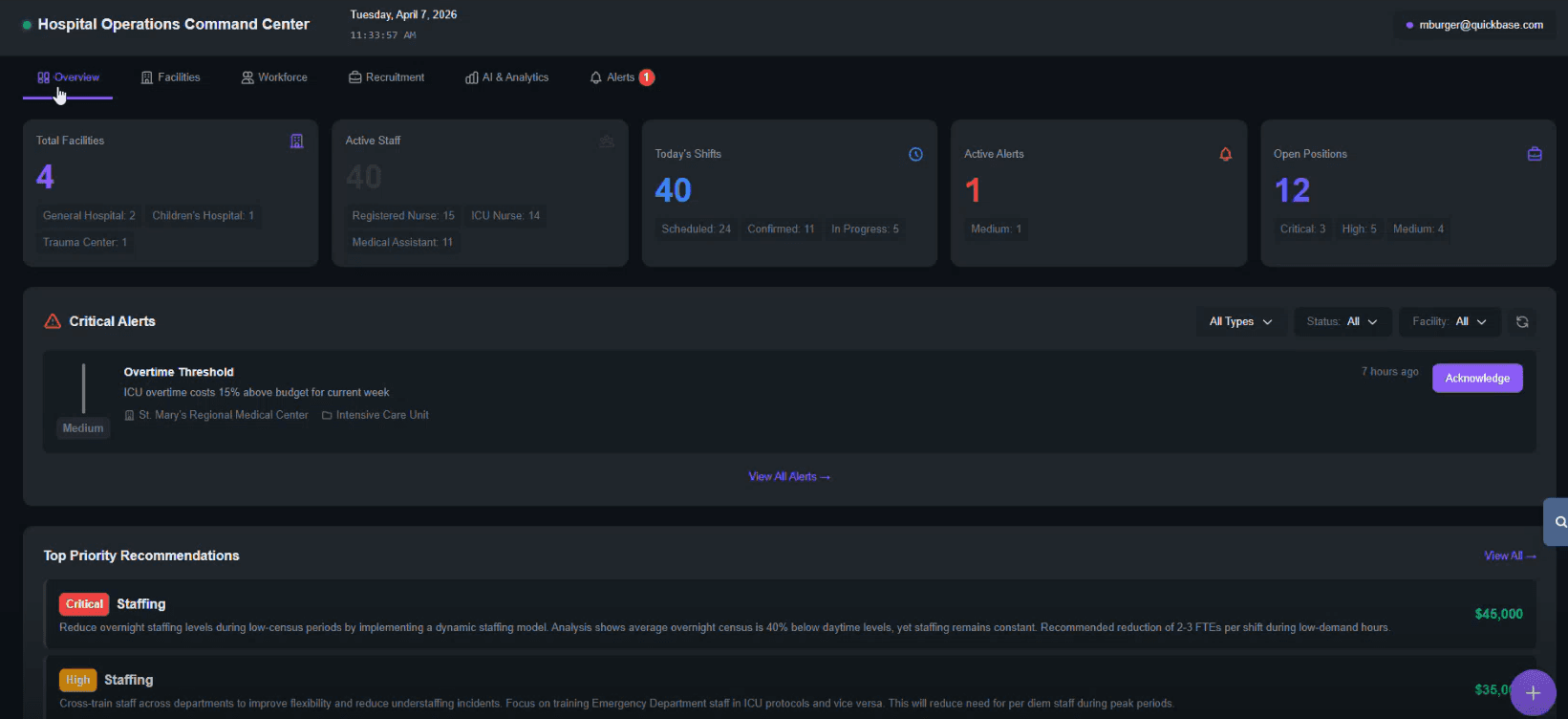
At the center of the app is an overview dashboard. It shows facilities, active staff, today's shifts, open positions, alerts, and top-priority recommendations. I can drill into a facility to see beds, assigned staff, and scheduled staff.
A workforce view shows every scheduled employee, with a calendar toggle and individual records including department, base pay, and shift differentials. Promote a nurse to charge nurse, and the rate updates. Apply a high-acuity, holiday, or on-call adjustment, and total cost updates with it.
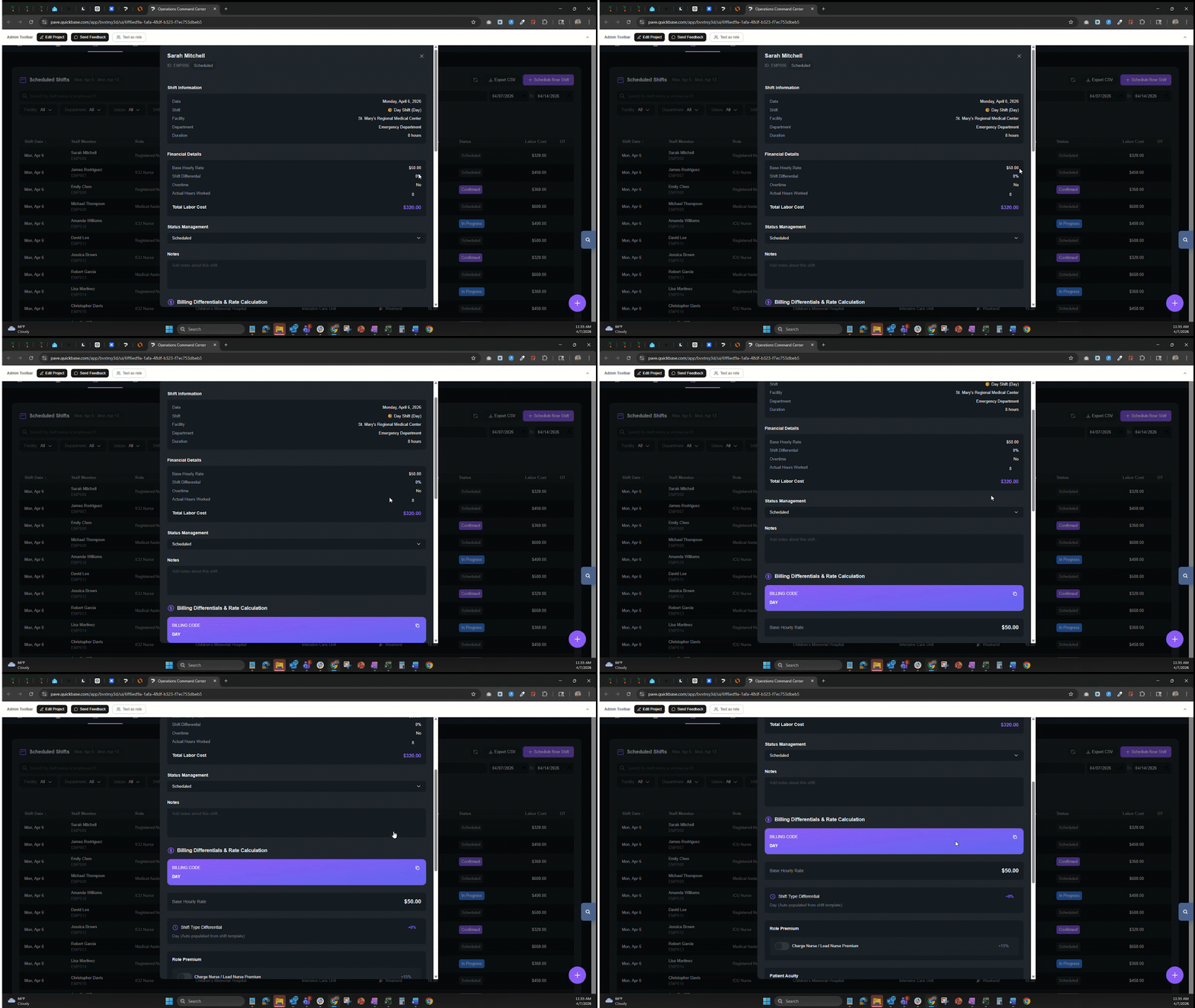
The moment Pave impressed me was around shift differentials. When I described how nurses get paid, Pave created fields for high-acuity premiums, on-call rates, holiday pay, and charge nurse adjustments without me explicitly defining each one. It picked up what I meant from the domain language and ran with it.
"I felt like it was learning along with me as I built."
Mock data took a couple of rounds. Early on, the number of beds in each hospital came back in the millions. I told Pave I needed realistic ranges, and it adjusted. Small thing, but it mattered because realistic data made the rest of the app usable instead of a toy.
The app clicked for me when I could describe a scenario and watch the system respond. I'd input something like a car crash bringing in a wave of patients, or a cyberattack taking the EHR offline. The app surfaced which facilities were affected, estimated the staff required, calculated the cost, and recommended actions. I didn't have to piece it together first. The response was immediate.
Start to finish, the build took about five hours across a couple of days.
With training, this could go live in two to three weeks
I'd want to test it more thoroughly before calling it production-ready. But the bones are there.
This app fits a smaller operation — one or two facilities, a team moving off paper or spreadsheets. With some training and input from the people who'd actually use it, I think a scaled version could be live in two to three weeks. That's aggressive, but the data model is in place, and any tweaks can be handled through Pave.
Five things I learned building with Pave
- Start with the workflow. I described what happens during an emergency: who responds, in what order, with what information. The data model followed from that.
- Use the language you'd use with a coworker. I described things in plain business terms. Pave translated that into structure even when my inputs weren't perfect.
- Push back on the first round of mock data. Whatever Pave generates first will need adjustment. Once corrected, it becomes a reliable foundation.
- Watch what Pave adds on its own. It introduced fields and relationships I hadn't thought of but turned out to be necessary. Pay attention to those — they're often right.
- Build in layers. I started simple and expanded. Trying to solve everything in one prompt would have slowed me down.
Try this prompt
Want to build something like this? Try Pave and enter this prompt:
Build a hospital operations and workforce platform that centralizes scheduling, labor cost management, and demand forecasting across multiple facilities. Include constraint-based scheduling (roles, certifications, licenses, union rules), multi-facility float pools, and shift differentials for nights, weekends, holidays, and high-acuity coverage.
Add an AI optimization layer that forecasts patient demand, recommends staffing reallocations, and flags overtime spikes. Include a scenario simulator for patient surges, staff shortages, and budget cuts, with one-click re-optimization. Surface everything in a command center dashboard with drill-down from facility to department to role.
About Pave:
Pave is Quickbase's AI app builder for teams that need to turn ideas into real, usable business apps fast. Unlike prototype-only tools, Pave helps teams create production-ready apps with data, governance, permissions, hosting, and deployment built in. Built on Quickbase's secure infrastructure, Pave gives businesses a more practical, controlled path from experimentation to execution. Start building now at quickbase.com/pave.

Written by:Matt Burger