How I Helped My Team Spot Burnout Patterns Earlier
By Soumya Ghosh, Program Manager at Quickbase
I've gone through periods of burnout before, and, if you've been there, you might know how difficult it is to notice the problem before it's unmanageable.
Most of the time, the pattern builds quietly for weeks or months before somebody visibly burns out, disengages, or starts struggling at work. And once you reach that point, it's harder to recover.
When I went looking for a solution, I was surprised there was no lightweight, structured way to connect how someone feels day to day with the actual work conditions causing it. Most advice around burnout stays very general.
As I see it, a company that takes care of its employees is a company that wins. And to support employees properly, I wanted a way for teams to spot patterns of burnout earlier, before they become a much bigger problem. So I turned to Pave.
A wellbeing tracker that connects daily work patterns to early burnout signals
I built a lightweight daily check-in app I called Thrive to help employees notice early patterns of overload.
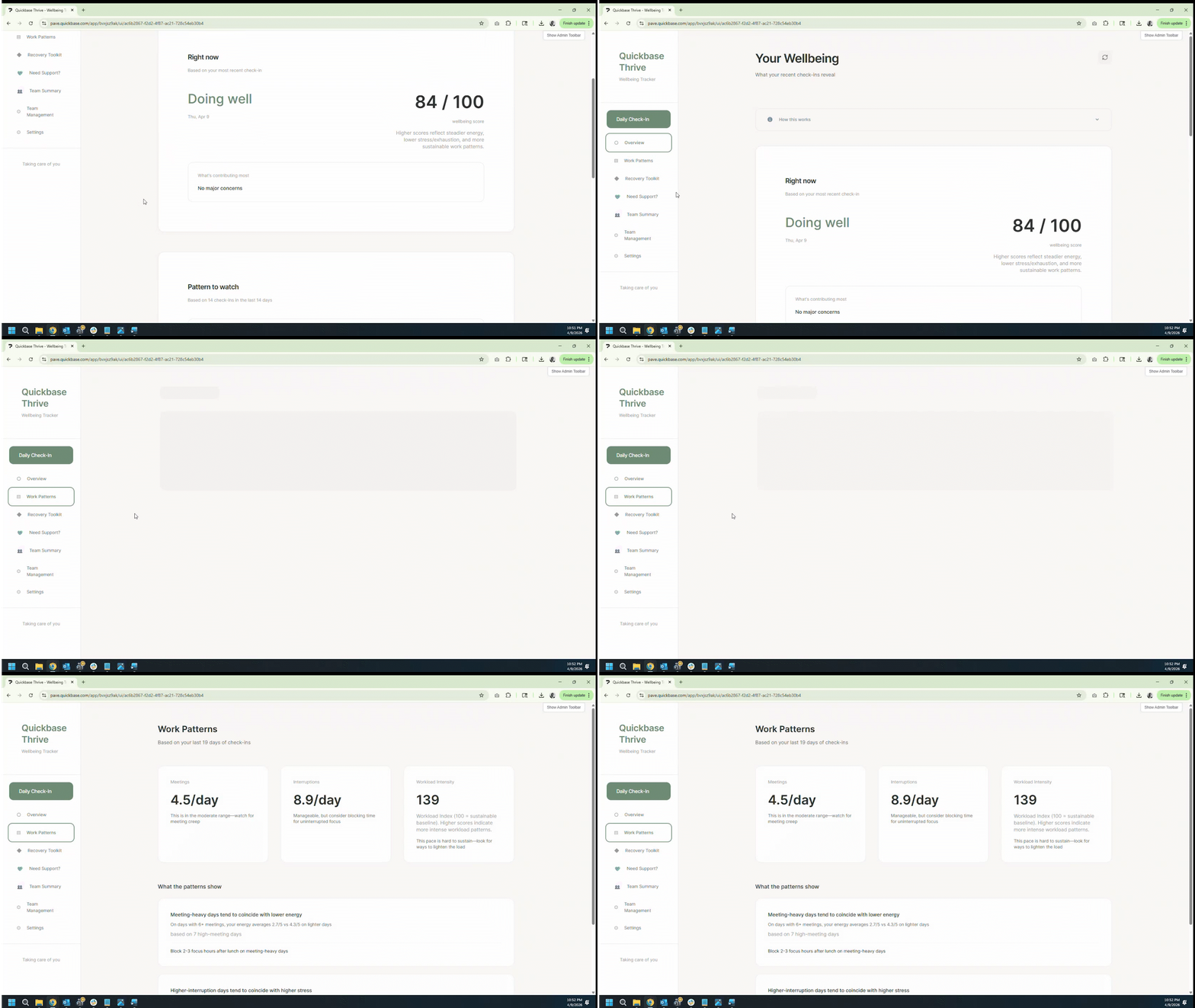
At the end of the workday, employees fill out a short check-in covering fields like stress level, focus quality, and hours worked. Over time, the app connects those signals and surfaces patterns based on recent entries.
It doesn't diagnose burnout. Instead, it shows you patterns over time. For example, meeting-heavy days tend to correlate with lower energy, or interruption-heavy days may correlate with higher stress levels.
There are three layers to the app.
For employees, it acts as a personal reflection tool. Individual entries and notes stay private, and the experience is intentionally designed to feel calm and supportive rather than invasive.
For managers, there's a team summary view that only shows aggregated team-level patterns such as participation rates, wellbeing trends, workload intensity, and recurring concerns. Managers cannot see personal responses or individual notes, and employees have to accept a membership request before their data contributes to a team summary.
For the organization, it creates a more proactive way to spot work patterns that quietly reduce wellbeing, engagement, and productivity over time.
Anyone close to a problem can now build the solution
What surprised me most about the process was how easy it actually is to build a working app.
I'm not a developer and I can't code to save my life. But within a few prompts, I could already see something real in front of me. I built this in about twelve hours, across three or four days.
Before I started building, I wrote down the problem clearly in my own words, refined it into structured prompts using generative AI tools, and then just started building. From there, the iterations became conversational: fix this, adjust that, test again.
The biggest improvements happened once my team actually started using the app. That surfaced issues I wouldn't have noticed on my own, especially around workflows, clarity, and usability. That feedback loop is what pushed the app much closer to something real and usable.
Five things I learned building with Pave
- Write the problem down first. Before I touched the app itself, I wrote down exactly what problem I wanted to solve. That made the prompts much easier to structure.
- Use detailed prompts early. The first prompts were long and specific because they needed to define the scope, workflows, and boundaries clearly. That foundation made the later iterations much smoother.
- Iterate as you go. The first version is not the final version. The real build happens in the back and forth. Fix something, test it, adjust it, and repeat.
- Test with real people. The biggest improvements happened once my team actually started using the app together. Real usage surfaces things you will never catch on your own.
- Build for a real problem you actually care about. I built this because I had experienced burnout myself. That made it easier to make decisions around tone, privacy, recovery support, and the overall experience of the app.
Try this prompt
Want to build something like this? Try Pave and enter this prompt:
Build a premium, production-quality web app called Burnout Early Warning Tracker. The app helps employees notice early signs of overload and burnout risk by tracking work intensity, meeting burden, interruptions, focus quality, breaks, energy, stress, and emotional exhaustion through lightweight daily inputs.
This must be frontend-only with no backend dependency. Use browser storage for persistence. The app should feel humane, intelligent, calm, and professionally designed.
Core sections: Create Overview, Daily Check-In, Workload Signals, Trends, Recovery, Insights, Settings
Core functionality: Users should be able to submit fast daily check-ins covering energy, stress, motivation, meeting load, interruption load, hours worked, focus quality, break quality, emotional exhaustion, and sense of control; view a rule-based burnout risk level; see risk trends over time; understand top contributing signals; receive recovery suggestions; review workload signal patterns and weekly summaries
UI expectations: Include soft but professional visual design, premium risk visualization, supportive tone, elegant charts, realistic demo history, local persistence, dark and light mode, excellent empty states and onboarding.
This should feel like a serious internal wellbeing and workload-awareness tool, not a medical product.
About Pave:
Pave is Quickbase's AI app builder for teams that need to turn ideas into real, usable business apps fast. Unlike prototype-only tools, Pave helps teams create production-ready apps with data, governance, permissions, hosting, and deployment built in. Built on Quickbase's secure infrastructure, Pave gives businesses a more practical, controlled path from experimentation to execution. Start building now at quickbase.com/pave.

Written by:Soumya Ghosh