What are Mobile Forms? A Guide for Field Teams
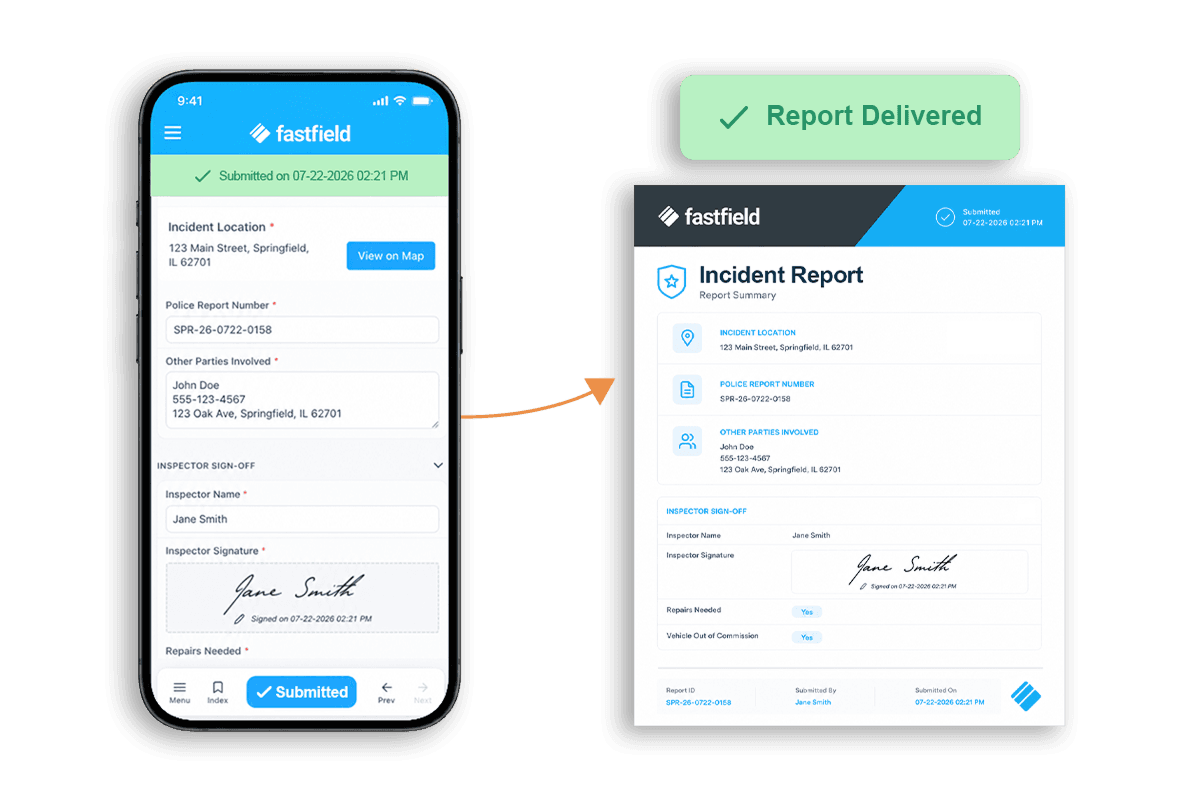
Mobile forms are digital forms designed for people to collect structured information from a phone or tablet at the point of work. Paired with features like offline capture and sync, they give field teams the flexibility to take notes and capture evidence while they complete inspections or checklists, instead of having to document and submit details after the fact. This lets them send real-time updates to the office, streamlines the manual work of using pen and paper, and provides proof directly from the field.
Mobile forms let teams manage field data more efficiently and help supervisors make informed decisions about the operation. This guide explores how mobile forms work compared to digital forms, the mobile form process from start to finish, and the benefits of offline form completion.
Mobile Forms Use Cases
Mobile forms help teams collect data and evidence across a variety of field tasks. Here are some common use cases for a mobile form:
- A supervisor uses a mobile form to complete a safety-focused construction site inspection using their personal mobile phone.
- A repairperson updates a work order via mobile form on a tablet before and after inspecting a piece of equipment.
- A quality engineer creates a mobile form to standardize manufacturing quality checks, and the team uses a device to complete the form in the field.
In each situation, the mobile form and the underlying technology provide the infrastructure to capture details in the moment and sync them to a central digital record for review in the office.
The mobile form also serves as a baseline standard, reminding the worker what to inspect for, as in the case of a safety check, or which maintenance tasks to complete. The worker then uses the form for record-keeping, marking off each expected step in a checklist or other field type. If they need to capture proof of damage or evidence that they corrected a hazard, they may also take and attach photos or videos to the digital record.
The full capability of a mobile form depends on the product and configuration. For instance, FastField's field data collection solution supports offline operation, exact location tagging, signature collection, and conditional fields that allow for more comprehensive field data.
Digital Forms vs. Paper Forms
Digital forms and paper forms are the two primary ways that teams can collect and sync data while working in the field. Because mobile forms are completed via a device, they are considered a subset of digital forms.
Besides their core purpose of data collection, digital and paper forms differ significantly, particularly in three key areas:
- Capture. Mobile forms allow users to type notes directly into fields using their phone or tablet keyboard, while a paper form requires a pen or pencil and a clipboard or surface. The consistent font on a digital device makes form data readable, while handwriting varies, especially in field conditions like inclement weather or bulky PPE.
- Handoff. On mobile, handoff from field to office typically happens automatically through a platform sync that triggers a notification for the in-office supervisor. In the case of a paper form, someone must physically hand the form to another stakeholder, or they may scan or re-enter the information in a digital system to transfer via email or system upload.
- Practical constraints: Using mobile forms can introduce additional costs and steps upfront, since they require system setup, a usable process, and a suitable device to complete the form. But mobile forms also connect evidence to a central record in minutes and reduce re-entry. Paper forms don't require a charged device or system expenses, but they require the additional work of transferring notes to another system every time someone completes a form, and this time cost adds up.They're also subject to damage from the elements, like rain, snow, and wind. That can be a problem for teams that work primarily outdoors, such as construction crews doing framing inspections before the roof is on. A soaked or torn form can mean going back to redo the inspection.
Paper forms are a familiar medium that requires virtually no training or setup to implement, but they also carry inefficiencies. While mobile forms depend on technology and conditions like charging and pre-loading forms for offline entry, mobile forms help simplify and speed data collection in the field when used with the right platform.
Digital Forms vs. Paper Forms | Mobile Forms | Paper Forms |
|---|---|---|
Entry | Typing notes into fields using a smartphone or tablet | Writing notes on a piece of paper using a pen or pencil |
Attachments | Photos, videos, or voice memos captured using the device can be attached to the form | Not possible in the field and would require transferring media from a device to the digital record when manually entering form details into the system later |
Legibility | Uniformly readable based on a consistent font | Variable due to individual handwriting differences and working conditions (e.g., gloves that limit hand mobility, ink that smudges from sweat or rain) |
Validation | Digital signatures from the field or the office | Physical signatures on the paper form, which are then scanned into the system. Signing must happen in person. |
Handoff | Happens automatically and digitally when the form syncs to the central record and notifies approvers | Must happen in person when the field worker hands the form to an approver or supervisor, often after returning to the office |
Practical constraints | Requires a charged device, platform set-up, and a standardized process. | Only requires the paper form, a writing utensil, and a writing surface. |
How Mobile Forms Work From Capture to Review
Mobile forms can support a wide range of field workflows. Here's one example of how they look in practice, using a hypothetical equipment inspection record.
A supervisor or inspector starts by using FastField to build the exact mobile form they need, or uses a report template that copies over the same fields used for prior similar inspections.
The inspector then goes out to the field with the form pre-loaded on their smartphone or tablet. Pre-loading their FastField form allows them to use the form even without an internet connection in remote field locations or extreme weather conditions.
After arriving at the piece of equipment for inspection, the team member records key details in FastField, like the equipment ID and detailed observations about its condition or operation, even without internet access. They also take a photo that illustrates the defect and attach the image to the form to be synced to the digital record.
As soon as the inspecting team member returns to a location with internet connection, the completed form syncs to the central record automatically in real time.
The supervisor receives a notification of the form submission. They receive all evidence at once, including detailed notes and media about the condition of the asset collected via their FastField form. As a result, they can review the complete equipment inspection from the office and quickly make an informed decision about what action should follow.
Finally, the supervisor can sign off on next steps digitally and notify the field team so that work can continue.
Do Mobile Forms Work Offline?
Mobile forms work offline if you're using a platform with offline capture and sync functionality like FastField. With FastField, you can use mobile forms even if you're in the field with no internet connection (for example, inspecting equipment in a remote area).
These steps show how a user can complete a form while their device is offline in the field:
5 Steps for Completing Mobile Forms While Offline | |
|---|---|
1. Load Users load FastField forms on their device while connected to the internet before beginning offline use. | 2. Capture During the inspection or checklist completion, they take notes in and capture evidence within the form fields. |
3. Save Users can complete and submit the form to save it in FastField, even when offline. | 4. Sync If submitted while offline, forms wait in FastField's "Sync" folder in the interim. When the device reconnects to the internet, the form syncs so that the office receives the record. |
5. Review When the office receives the form that was completed offline, they can review the notes and evidence captured in the field and approve the inspection or sign off on next steps. | |
How to Test Your First Mobile Form
After you build your first mobile form, your team should test its offline mobile entry and sync capabilities from the field. The following pilot checklist will help you ensure that your mobile form is ready for operation:
Pilot Checklist
|
FastField makes building, testing, completing, and sharing mobile forms easy, whether you're completing an inspection record, updating a work order, or standardizing data capture. Explore FastField mobile forms and start a free trial to test one existing field form from capture through successful office receipt.

